
/Assets/arrow-facing-left--black-01.svg)
/Assets/navigation-global--close-symbol-black-01-1.svg)

/Assets/Icon%20Library/social/facebook-logo.svg)

/Assets/Icon%20Library/social/instagram-logo.svg)
/Assets/Icon%20Library/social/youtube-logo.svg)





A common question that business owners bring to us is “Should I build my business website on HubSpot or WordPress?”
If you're building a website that serves as the marketing engine for your business, HubSpot Content Hub Pro offers native integration, closed-loop reporting, and reduced cognitive load for your team. However, if you need maximum technical control, server-side access, or are running a product-heavy e-commerce operation, WordPress may be the better choice.
The "right" answer depends entirely on what you're trying to accomplish. This article gives you the honest picture, so you can make the right call for your business and your specific website strategy.
One thing you should know before reading: We build roughly 96% of our client websites on HubSpot. We're not neutral. We've done our best to be fair, and we'll tell you plainly when WordPress is the smarter choice, but you deserve to know our bias going in. If anything, we think that transparency makes this guide more useful, not less.
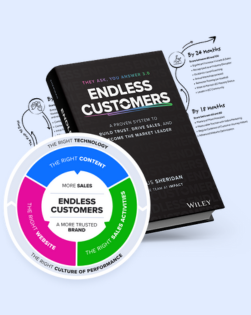
Our perspective comes from years of experience with both platforms while implementing the Endless Customers System™ with our clients. This system positions your website to be the most known and trusted in your market.
FREE BOOK PREVIEW
Endless Customers Special Preview Edition
Get a taste of the book that brings you a proven system to build trust, drive sales, and become the market leader. This special preview edition has select chapters and The Four Pillars of a Known and Trusted Brand, resources to accelerate your success, and more.
What Is HubSpot Content Hub?
HubSpot Content Hub (Formerly CMS Hub) is a content management system built for businesses that use their website as a marketing and sales tool.
Content Hub Pro (around $450–$500/month) includes everything your marketing team needs to run without a developer:
- Website hosting and content management
- Built-in SEO tools and recommendations
- Native analytics and closed-loop reporting
- A/B testing capabilities
- Advanced form builders with custom fields
- Marketing automation integration
- Email marketing tools
- AI-powered content assistance
- Social media management
Everything connects to HubSpot's CRM. You can trace a specific blog post directly to a closed/won deal and actual revenue. WordPress cannot do this without significant third-party integrations and someone to keep them from breaking.
What Is WordPress?
WordPress powers approximately 45% of all websites on the internet. The open-source software itself is free to download.
What you get:
- Zero platform cost (you pay only for hosting)
- A massive ecosystem of themes and plugins
- Complete control over your server environment
- An extensive developer community
- The flexibility to build virtually any type of website
- Strong e-commerce capabilities through WooCommerce
But "free" can be misleading.
WordPress is basic by default. Most businesses need custom themes, page builders like Elementor, and a stack of plugins to unlock the features they actually need. You'll also handle hosting, security, updates, backups, and maintenance yourself, or pay an agency to do it for you.
The Questions You Should Actually Be Asking
Before comparing features, get clear on what actually matters for your business:
-
How much cognitive load can your team realistically carry?
-
What is the true cost of ownership over 3–5 years?
-
How much technical control do you actually need?
-
How easily does your website plug into your sales process?
-
What security vulnerabilities are you willing to manage?
For businesses implementing a content-driven sales system, these factors determine success or failure.
Closed-Loop Reporting: The Advantage That Changes Everything
Closed-loop reporting means you can trace specific content through your entire funnel, from first visit to closed deal, and know exactly how much revenue it generated.
With HubSpot, you can answer questions most businesses never can:
- Which blog posts led to the most closed deals this quarter?
- What was the average deal size for leads from your pricing page vs. your product comparison pages?
- How long does it take for someone who reads your "Ultimate Guide" to become a customer?
- What's the lifetime value of leads who engaged with video vs. those who didn't?
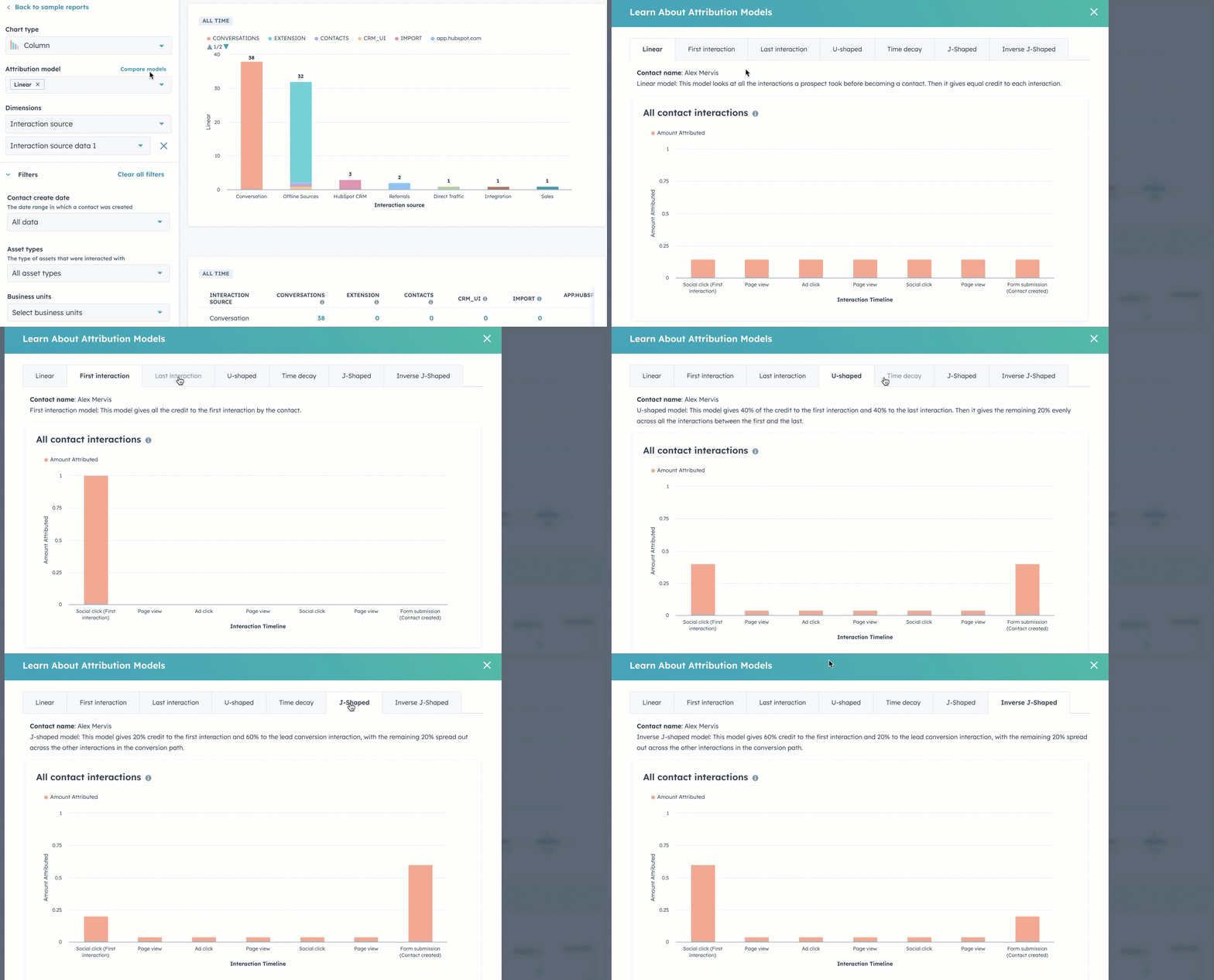
You're not just tracking traffic or form fills. You understand which content drives revenue, so you know where to invest more and what to cut.
Can WordPress Do This?
Technically yes. In practice, it requires stitching together multiple third-party tools:
-
Google Analytics for traffic data
-
A form plugin (Gravity Forms or WPForms)
-
A CRM integration (Salesforce, HubSpot CRM, or similar)
-
A marketing automation platform
-
Custom reporting dashboards
You'll also need someone to maintain all these connections, especially in the chance that something breaks.
The pattern we see repeatedly is that integrations work for a while, then someone updates a plugin, and tracking goes dark. By the time you notice, you've lost weeks of data.
Security: Closed Ecosystem vs. Open Target
WordPress powers 45% of all websites and is open-source. That makes it the primary target for hackers worldwide.
The WordPress Security Reality
WordPress itself is reasonably secure when properly maintained. The vulnerabilities come from:
- Third-party plugins that aren't regularly updated
- Outdated themes
- Poor hosting configurations
- Delayed security patches
- Server misconfigurations
When a vulnerability is discovered in a popular WordPress plugin, hackers immediately have access to potentially millions of sites running that plugin.
To stay secure, you need a security-focused hosting provider (like WP Engine), regular plugin and theme updates, security monitoring tools, a backup system, and potentially a maintenance contract.
How HubSpot Handles It
HubSpot operates as a closed ecosystem. You don't have server-side access, which initially feels limiting but is actually a feature.
Because HubSpot controls the entire environment:
-
Security patches are applied automatically
-
No third-party plugins create vulnerabilities
-
SSL certificates are managed for you
-
Backups happen automatically
-
There's no server configuration to manage
The tradeoff: if you need deep technical control or server-side access, HubSpot won't work for you.
Ease of Use: What It Actually Costs Your Team
Ease of use isn't always about learning curves. You have to also consider the cognitive load: how much mental energy your team burns managing the platform instead of creating content and closing deals.
HubSpot: One Tool, One Interface
With HubSpot, everything lives in one dashboard: content creation, SEO, A/B testing, forms, email, analytics, social, and lead management. Your team learns one interface. One set of tools. One workflow. One support number when something goes wrong.
This is especially valuable when your team needs to create and publish educational content quickly, without calling a developer every time.
WordPress: Maximum Flexibility, Maximum Complexity
WordPress's strength is also its weakness: infinite flexibility through plugins and themes.
Want A/B testing? Add Optimizely. Better forms? Install Gravity Forms. SEO? Add Yoast. Marketing automation? Integrate a third-party platform.
Each addition means another login, another interface, another potential security hole, another tool to update, and another vendor to manage.
The cognitive load compounds fast.
Your marketing team now has to maintain fluency in WordPress + Elementor + Yoast + Gravity Forms + MailChimp + Google Analytics + whatever quirks live in your specific theme.
Plenty of successful businesses run on WordPress. But it demands ongoing technical management, and that management has a cost whether you're paying a developer or spending your own time.
The Real Cost Comparison
When people say "WordPress is free," they mean the WordPress software is free. The cost of running a professional WordPress site is a different number entirely.
Let's break down the costs of both HubSpot Content Hub Pro and WordPress:
HubSpot Content Hub Pro: All-In Monthly Cost
|
Item |
Cost |
Notes |
|
Content Hub Pro Subscription |
$450–$500 |
Hosting, security, updates, and features included |
|
Professional Hosting |
Included |
Enterprise-grade with automatic scaling |
|
Security & SSL |
Included |
Automatic SSL, monitoring, patches |
|
A/B Testing |
Included |
Native, no plugins needed |
|
SEO Tools |
Included |
On-page recommendations and optimization |
|
Advanced Forms |
Included |
Unlimited forms with custom logic |
|
Marketing Automation |
Included |
Email workflows, lead nurturing |
|
Analytics & Reporting |
Included |
Native reporting with CRM integration |
|
Updates & Maintenance |
Included |
Automatic, no maintenance windows |
|
Total Monthly Cost |
~$500 |
Fixed and predictable |
WordPress Professional Setup: All-In Monthly Cost
|
Item |
Cost Range |
Notes |
|
WordPress Software |
$0 |
Free and open-source |
|
Professional Hosting |
$25–$75 |
WP Engine, Kinsta, etc. |
|
Security Suite |
$10–$50 |
SSL, security plugins, monitoring |
|
Premium Theme |
$5–$15 |
Amortized annual cost |
|
Page Builder |
$10–$20 |
Elementor Pro, Divi, etc. |
|
SEO Plugin |
$8–$20 |
Yoast Premium, Rank Math Pro |
|
Form Builder |
$10–$20 |
Gravity Forms, WPForms Pro |
|
A/B Testing Tool |
$30–$120 |
Optimizely, Convert, or similar |
|
Analytics & Reporting |
$0–$50 |
GA is free; advanced tools cost more |
|
Email Marketing Platform |
$50–$300 |
MailChimp, ActiveCampaign, etc. |
|
Agency Maintenance |
$300–$3,000 |
Monthly retainer for updates, support, security |
|
Total Monthly Cost |
$450–$3,650+ |
Highly variable based on needs |
The WordPress Ghost Costs That No Spreadsheet Captures
In our experience working with hundreds of clients, we've seen these "ghost costs" associated with WordPress:
-
Time and cognitive load: Your team spends hours managing multiple tools, troubleshooting plugin conflicts, and coordinating between vendors.
-
Opportunity cost: When your website goes down or tracking breaks, you lose leads and data you'll never recover.
-
Migration difficulty: Switching themes or page builders often means a full rebuild. Your content isn't as portable as you think.
-
Developer dependency: Most businesses need ongoing developer support to keep a professional WordPress site running.
E-Commerce: Where WordPress Usually Wins
If your primary business model is a product-heavy online store, WordPress with WooCommerce is likely the better choice.
HubSpot's E-Commerce Limitations
HubSpot wasn't built as an e-commerce platform. Content Hub can handle a handful of products, simple online purchases, and service-based offerings. However, it's not built for large product catalogs, complex inventory management, or shipping logistics.
Many businesses use Shopify for their actual store and HubSpot for marketing and educational content, integrating the two.
WordPress E-Commerce with WooCommerce
WordPress with WooCommerce gives you unlimited products, complex inventory management, extensive payment gateway options, and complete control over the customer experience. If e-commerce is your primary revenue model, WordPress delivers more flexibility and functionality.
Maximum Technical Control: WordPress Wins Here, Full Stop
If your website requires server-side code execution, custom database queries, or highly specialized functionality that doesn't fit a standard CMS, stop reading and go with WordPress.
This isn't a close call. WordPress is open-source. You have complete control over your server environment, your database, and your stack. You can build almost anything. If you have a technical team with specific requirements, that flexibility is genuinely powerful and worth the tradeoffs that come with it.
Where HubSpot Falls Short for Developers
HubSpot doesn't allow server-side access. No custom PHP, no direct database queries, no server configuration. HubSpot offers HubL (their own markup language) for dynamic templates and personalization, but it's intentionally limited compared to full server-side programming.
If you're a technical team building something that needs to live at the infrastructure level, HubSpot will frustrate you. WordPress won't.
Migration and Portability: The Difficult Truth
Switching platforms, or even agencies, often means a complete rebuild. This applies to both HubSpot and WordPress.
The Portability Myth
WordPress content is tied to your specific theme, page builder, plugins, shortcodes, and custom configurations. Switching from Elementor to Divi? Rebuild. Changing agencies? If they use different tools, rebuild again.
HubSpot content is tied to HubSpot's system. Export your content and the formatting may not transfer cleanly. Custom modules won't work elsewhere.
Regardless of which platform you choose, plan to stay with it for at least 3–5 years.
Neither platform offers an easy, clean migration path.
Who Should Choose HubSpot?
HubSpot Content Hub Pro is the right choice if you:
- Need a marketing engine where your website generates and nurtures leads through content
- Want to know which content actually drives revenue, not just traffic
- Want to reduce tool complexity and manage everything in one platform
- Prioritize security and reliability without a dedicated IT resource
- Are creating high volumes of educational content and need your team to move fast
- Have $5M+ in annual revenue and can invest in tools that deliver long-term ROI
- Don't need complex e-commerce, or already have a separate platform like Shopify
Who Should Choose WordPress?
WordPress is genuinely the right choice (not a fallback) if you:
- Need real technical control. Server-side code, custom database queries, full server access. WordPress delivers this without compromise. If your team has specific infrastructure requirements, don't fight it. Build on WordPress.
- Are already on WordPress and migration costs don't justify switching. A working site with strong SEO and a stable stack isn't worth blowing up just to change platforms. If what you have is working, stay put and invest in content instead.
- Have tight budget constraints and the technical resources to manage the platform well. That last part matters. WordPress on a shoestring works, but only if someone on your team can own the maintenance, security, and integrations. Without that, the "savings" disappear fast.
- Require highly specialized functionality that doesn't fit a standard CMS: custom integrations, unique data structures, or niche tools that only play nicely with open-source environments.
What We've Seen in Practice
We've built websites on both platforms for years. This very site is built on HubSpot.
We build approximately 96% of our client websites on HubSpot Content Hub because for businesses implementing a content-driven sales system, HubSpot makes execution faster. Our clients need to publish educational content at scale, understand what's working, and have marketing and sales teams aligned on the same data.
We still build WordPress sites when it's genuinely the right fit, including for e-commerce businesses, specialized use cases, and situations where budget is the binding constraint. Both platforms have legitimate strengths.
Frequently Asked Questions
Is WordPress really free?
The software is free. Running a professional WordPress website isn't. Hosting ($25–$75/month), security tools, premium themes or page builders, plugins, and often an agency maintenance contract ($300–$3,000/month) put the total cost at $450–$3,650+ per month.
Can WordPress do everything HubSpot does?
Technically yes, but you'll integrate and maintain multiple third-party tools for your CRM, email marketing, analytics, A/B testing, and more. The challenge is complexity and ongoing integration maintenance.
Is HubSpot more secure than WordPress?
HubSpot operates as a closed ecosystem with no server-side access, which eliminates entire categories of vulnerabilities. WordPress is open-source and powers 45% of all websites, making it the primary target for hackers. Most vulnerabilities come from outdated plugins, themes, and server misconfigurations.
Can I move my WordPress site to HubSpot easily?
Blog posts and pages can transfer, but custom designs, layouts, and functionality typically require rebuilding. The same is true in reverse. Plan to stay with your chosen platform for 3–5+ years.
Do I need a developer to use HubSpot?
For initial setup and custom template building, yes. Once the site is properly built with flexible modules, your marketing team should manage content independently.
Do I need a developer to use WordPress?
It depends on your setup. With modern page builders, many teams manage day-to-day content without developer help. But plugin updates, security patches, conflict troubleshooting, and custom functionality typically require developer expertise.
What if my business is too small for HubSpot?
If $500/month is a significant portion of your marketing budget, WordPress is likely more practical. HubSpot makes the most sense for businesses where the platform's efficiency can directly compound deal flow and revenue.
Do agencies prefer HubSpot or WordPress?
Agencies use both HubSpot and WordPress for different reasons. Some prefer WordPress because it's familiar and creates ongoing maintenance revenue. Others prefer HubSpot because it reduces maintenance overhead and delivers better measurable outcomes. Neither preference makes one platform universally better for your business.
The Bottom Line
WordPress feels free but carries real, ongoing costs and complexity. HubSpot has a clear price tag, but that price includes the tools, security, and integrations that WordPress charges you extra for.
WordPress demands active security management. HubSpot handles it automatically.
If knowing which content drives revenue is critical to how you run your business, HubSpot's native integration is a genuine competitive advantage.
If you're comfortable managing multiple tools and don't need closed-loop reporting, WordPress works.
For product-heavy e-commerce, WordPress with WooCommerce typically wins. For businesses creating educational content at scale and tying it directly to revenue, we've consistently found HubSpot provides the more efficient path.
Neither platform is universally better. Choose the one that fits what you're actually trying to accomplish.
Ready to Make the Right Call?
If you're still uncertain which platform fits your business, we can help you decide in a single conversation. Our team has built hundreds of websites on both platforms, and we'll tell you honestly which one makes sense for your situation, even if it's not the one we'd build for you.
Schedule a call with us and walk away with a clear answer.
If you're also ready to build a website that works as a real marketing and sales engine, the Endless Customers Coaching Program is how we help businesses like yours put the whole system into practice. It's a hands-on program that gets your sales, marketing, and leadership teams running the same playbook so your website stops being a cost center and starts being your best salesperson.
Learn How to Make It Happen
The Endless Customers Coaching Program
If your marketing isn’t delivering and you’re ready for a proven, future-ready system built for the age of AI (one your team can run in-house) check out our coaching program.

Written By
Vin Gaeta is an Executive Coach at IMPACT, where his work combines leadership, sales, marketing, digital strategy, and buyer behavior. He helps businesses become easier to trust, easier to buy from, and harder to ignore, especially as AI changes how people search, learn, compare, and decide. Vin works with organizations in home services, construction, manufacturing, automotive, professional services such as payroll and accounting, SaaS, and other complex B2B spaces where the buying process is long and depends on trust. His clients include TMA Small Business Accounting, Inline Plastics, CSI Accounting, HomePride, and Family Security Plan. Whether he's coaching a leadership team, improving the sales experience, rethinking a website, or shaping content strategy, his goal is to make it easier for buyers to get answers and easier for businesses to earn the right to be chosen. Outside of work, Vin is a husband and dad of two girls. He's happiest with good music on, out on a hiking trail, or deep in geek and pop culture, and he leans fully into Halloween and horror season. He takes the work seriously but tries not to take himself too seriously. Vin is available to speak on Endless Customers alignment, sales enablement, 1:1 video, Assignment Selling, and website optimization.
Vin Gaeta is an Executive Coach at IMPACT, where his work combines leadership, sales, marketing, digital strategy, and buyer behavior. He helps businesses become easier to trust, easier to buy from, and harder to ignore, especially as AI changes how people search, learn, compare, and decide. Vin works with organizations in home services, construction, manufacturing, automotive, professional services such as payroll and accounting, SaaS, and other complex B2B spaces where the buying process is long and depends on trust. His clients include TMA Small Business Accounting, Inline Plastics, CSI Accounting, HomePride, and Family Security Plan. Whether he's coaching a leadership team, improving the sales experience, rethinking a website, or shaping content strategy, his goal is to make it easier for buyers to get answers and easier for businesses to earn the right to be chosen. Outside of work, Vin is a husband and dad of two girls. He's happiest with good music on, out on a hiking trail, or deep in geek and pop culture, and he leans fully into Halloween and horror season. He takes the work seriously but tries not to take himself too seriously. Vin is available to speak on Endless Customers alignment, sales enablement, 1:1 video, Assignment Selling, and website optimization.
/Assets/Icon%20Library/social/linkedin-logo.svg)
Share
/Assets/Icon%20Library/social/x%20corp.svg)
/Assets/Icon%20Library/social/mail-to.svg)
/Assets/base/Learning%20Center%20Resource%20Category%20Icons/Website%20link.svg)
READY TO IMPLEMENT ENDLESS CUSTOMERS™ IN YOUR BUSINESS?
You’ve learned the philosophy. Now it’s time to put it into action. Our coaches will help you apply the Endless Customers System™ to your sales and marketing so you can build trust faster, close deals sooner, and create a steady flow of new customers.
READY TO IMPLEMENT ENDLESS CUSTOMERS™ IN YOUR BUSINESS?
You’ve learned the philosophy. Now it’s time to put it into action. Our coaches will help you apply the Endless Customers System™ to your sales and marketing so you can build trust faster, close deals sooner, and create a steady flow of new customers.