/Assets/arrow-facing-left--black-01.svg)
/Assets/navigation-global--close-symbol-black-01-1.svg)
/Assets/base/Close.svg)

/Assets/Icon%20Library/social/facebook-logo.svg)

/Assets/Icon%20Library/social/instagram-logo.svg)
/Assets/Icon%20Library/social/youtube-logo.svg)




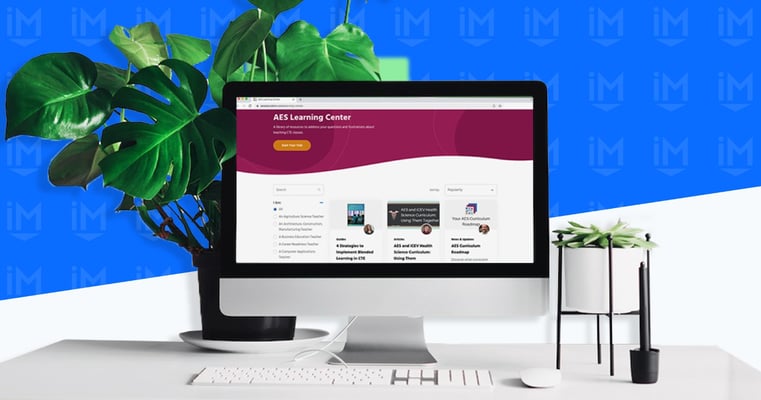
Most business blogs start with good intentions. You publish helpful articles, share company updates, announce new hires, and before you know it, you've built up years of content.
But over time, your potential customers are trying to find answers to their questions, and they're scrolling through long lists of posts, filtering through company news, holiday party recaps, and that “Hello World” post from when you first launched your blog.
If this process becomes frustrating or time-consuming, you’re actively pushing potential customers away who want to see if your business is a good fit for them.
That's exactly what a Learning Center fixes in your website strategy.
At IMPACT, we’ve helped countless businesses build Learning Centers that drive real results. That’s why we know this approach works.
While we’d love to help you create your own Learning Center as part of our Endless Customers System™, we’re here to guide you no matter where you’re at in your journey. We believe in what we do, but our mission is to help businesses thrive whether they choose to work with us or not.
FREE BOOK PREVIEW
Endless Customers Special Preview Edition
Get a taste of the book that brings you a proven system to build trust, drive sales, and become the market leader. This special preview edition has select chapters and The Four Pillars of a Known and Trusted Brand, resources to accelerate your success, and more.
What Is a Learning Center?
A Learning Center is a curated, organized hub for the educational content buyers actually need to make a decision.
Learning Center vs. Blog: What's the Practical Difference?
Let's be clear about what we mean when we talk about blogs versus Learning Centers, because the difference matters.
A blog:
- Time-ordered, with the most recent posts at the top
- Often mixes buyer-focused resources with company updates, announcements, and team news
- Relies on visitors scrolling, clicking through tags, or hoping the search function works
A Learning Center:
- Organized around buyer questions and the buying journey
- Can contain articles, videos, and other types of resources
- Contains only curated content that helps buyers make decisions
- Built for browsing, filtering, and helping visitors easily find their next logical question
With a Learning Center approach, visitors consume more helpful content. When it's easy to find what they need, buyers naturally engage with more of your resources. They move from one helpful piece to the next, building trust as they go.
What actually belongs in your Learning Center
A Learning Center that helps drive business results needs to have disruptive content that answers real buyer questions.
And what do they want to know? Every question. Every fear. Every concern. When they’re searching for this information online, that’s what they’re trying to figure out.
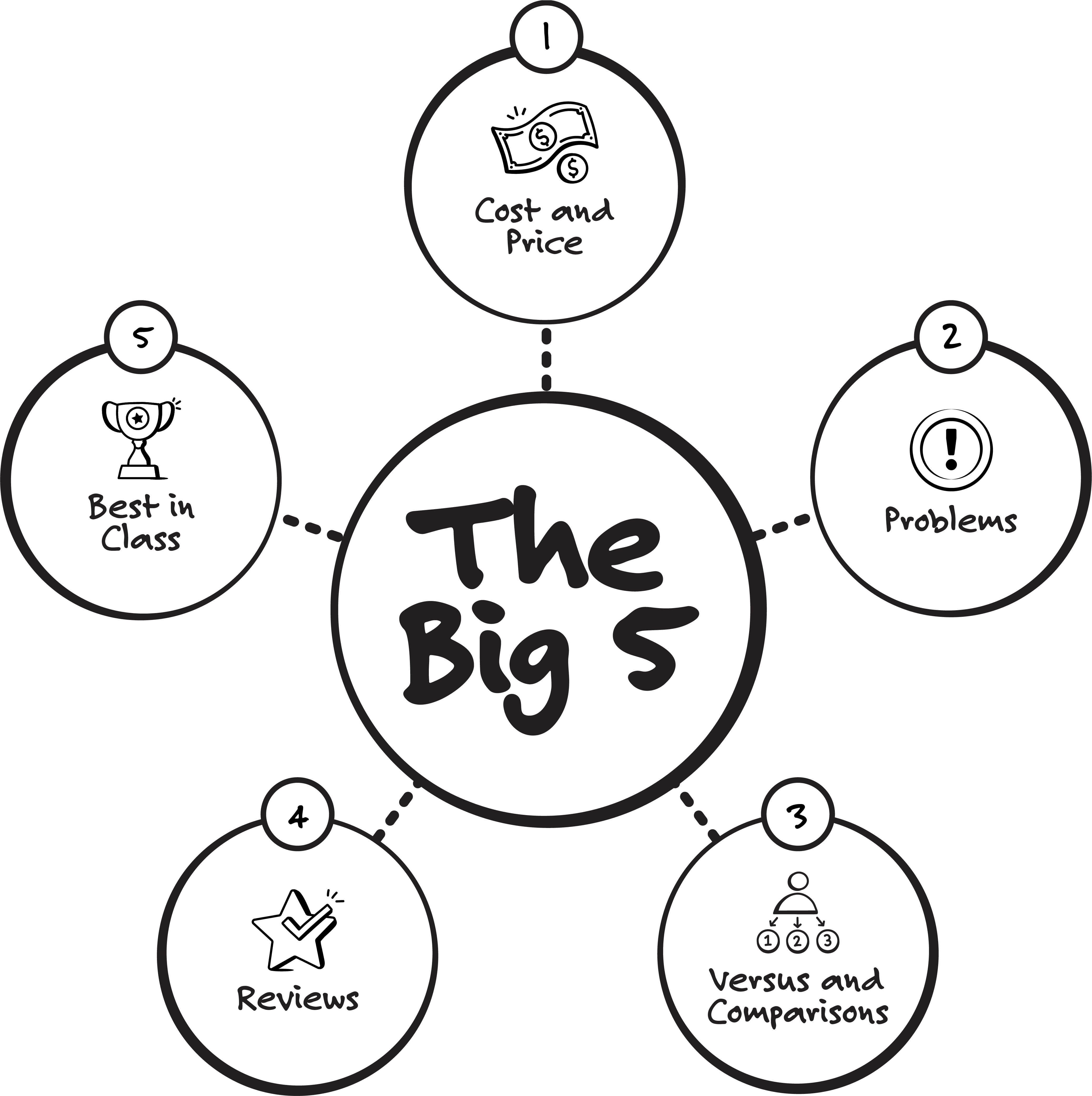
At IMPACT, we call these topics The Big 5:
-
Cost & Price: Everyone wants to know what they can expect to pay. They also want to understand what constitutes “value.” Such behavior is universal amongst all buyers.
-
Problems: A desire to buy something is often accompanied by fears and worries. What are the drawbacks? How could this purchase go wrong?
-
Versus & Comparisons: We love to compare. It’s how we make informed decisions, stacking one option against another to find the best solution for our needs.
-
Reviews: We want the good, the bad, and the ugly. And importantly, we want to know who a product or service is and is not a good fit for.
-
Best in Class: We search for the “best”, “most”, “top”, or whatever extreme we can find. Even though we might not end up buying “the best” - we at least want to be able to have a clear sense of our full suite of options.
The company news, the team updates, the holiday party photos? Those can live on a separate blog. But they shouldn't be front and center in your Learning Center, because they're not what your buyers came to find.
The four must-have components of a great Learning Center
If you're going to build a Learning Center that actually works, it needs to have these four capabilities:
-
Searchable
Your visitors need to be able to type a few words and quickly find what they're looking for. Good search functionality is crucial, and it's often the first thing people try when they land on a page. -
Easy to use
The layout should feel intuitive. Visitors should be able to sort content in ways that make sense to them. Maybe that's by date, by popularity, or by what's most relevant to their situation. -
Segmentable/Filterable
Visitors need to clearly see how your content is organized, and that organization needs to make sense to them, not just to your internal team. This is where filters come in. -
Personalized
Buyers should be able to narrow down what they see based on who they are, what they care about, and how they prefer to consume information. This is especially important when you have multiple buyer personas.
When you get all four of these right, something powerful happens. Your buyers can self-educate at their own pace, and you become their trusted guide in the process.
The filters that make a Learning Center work
Filters are the secret sauce of a great Learning Center. They're what transform a long list of content into a personalized experience for each visitor.
We typically recommend three types of filters:
Filter by topic
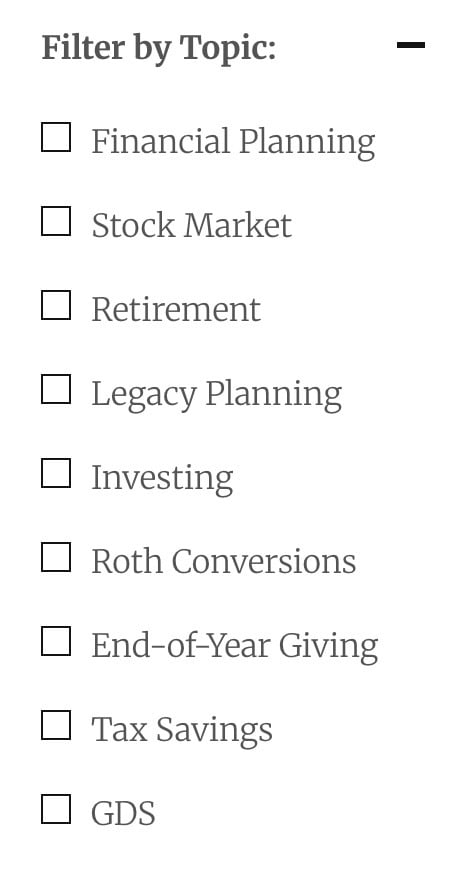 Organize your content around your products and services. Topics should not be around your internal departments or categories that only make sense to you.
For example, if you're a financial services company, your topics might be "Retirement Planning," "Investment Strategies," and "Tax Planning." These are things your buyers actually care about.
Filter by content type
People learn in different ways. Some prefer to read articles, while others want to watch videos. Some need calculators or tools, and some want comprehensive guides.
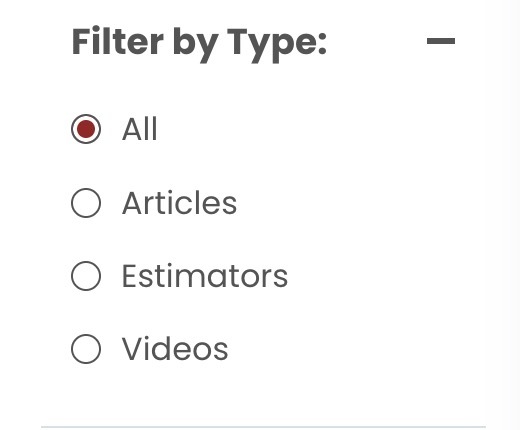
By letting visitors choose their preferred format (whether it's an article, video, guide, webinar, or self-service tool) you meet them where they are.
Filter by audience
If your products serve different industries or personas, let people identify themselves and see only the content that's relevant to them. 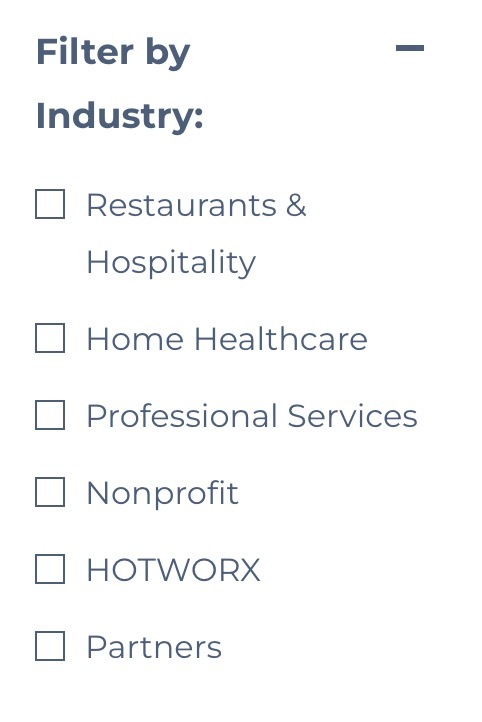
Going back to our financial services example, you might have content specifically for small business owners versus content for retirees. Let them filter accordingly.
When you combine these three types of filters, each visitor gets their own curated experience, even though you've built just one Learning Center.
How a Learning Center guides a buyer to a decision
Let's look at a real scenario to see how this works in practice.
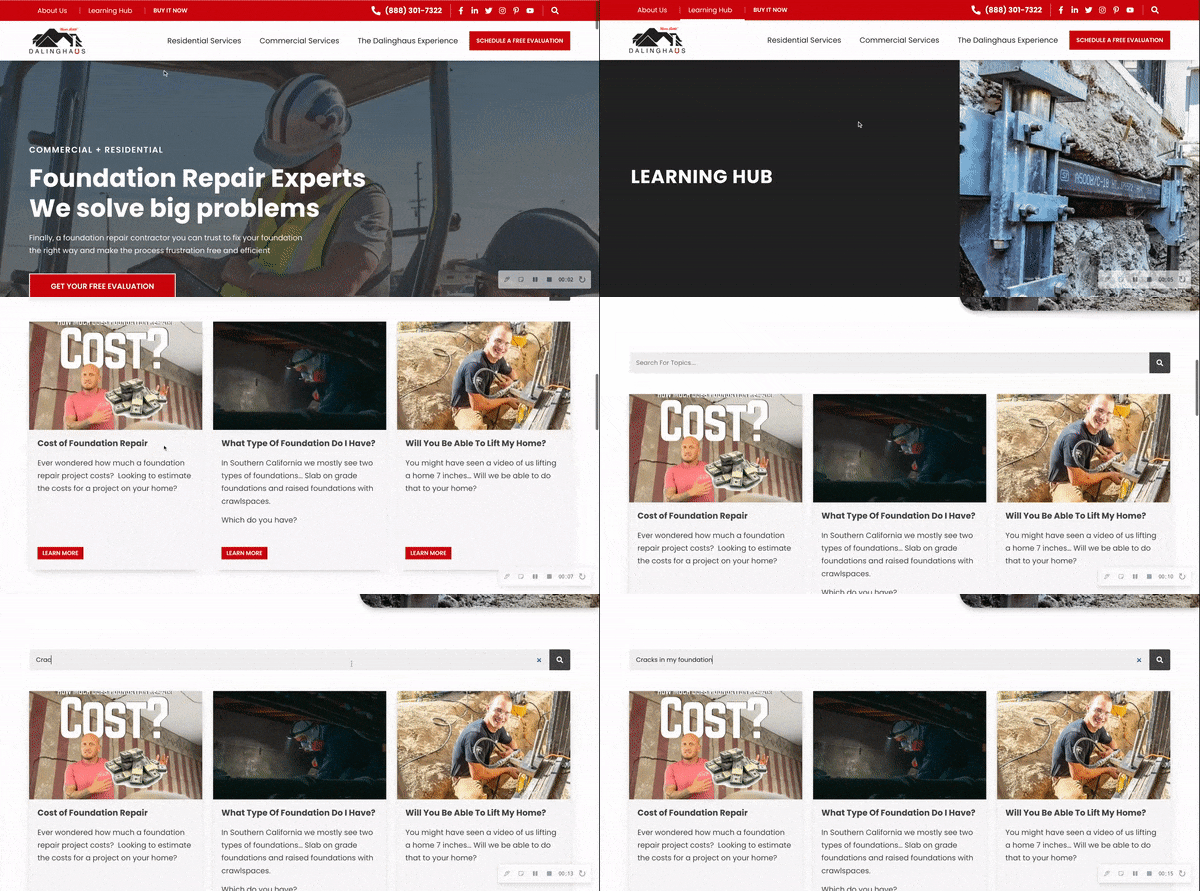
Imagine you run a foundation repair company, and you've built up a solid library of educational content. One day, a homeowner searches Google for "Why are there cracks in my foundation?"
They land on your article: "How Does a Slab Foundation Become Damaged or Cracked? 3 Common Causes."
Great! You've provided them with exactly what they searched for. But here's where most blogs fail, and where Learning Centers shine.
This visitor isn't done learning.
They have follow-up questions:
- How much is this going to cost to fix?
- Can I do this myself or do I need a professional?
- What should I look for when hiring a contractor?
If you just have a blog, they're stuck scrolling or searching, hoping to find the next piece they need. 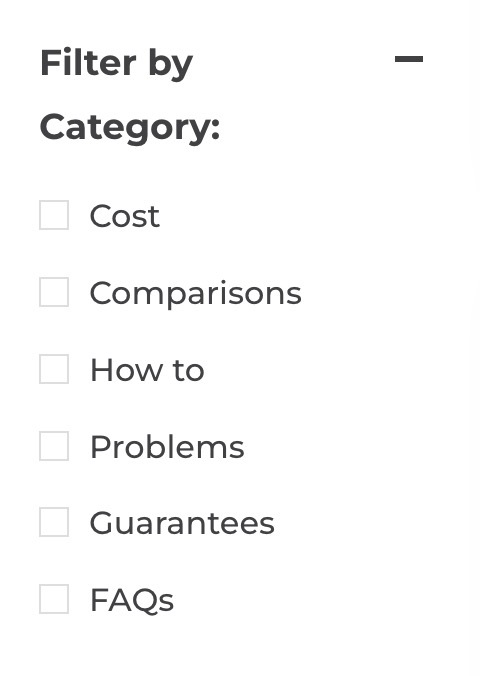
But with a Learning Center, those next steps are obvious. They can easily navigate to "Determining Foundation Repair Costs: Top 5 Factors that Impact Pricing" or "15 Questions to Ask Before Hiring a Foundation Repair Contractor."
Each piece of content they consume does three things:
- It answers their immediate question
- It builds trust in your expertise
- It makes the path to the next logical question clear
By the time they're ready to reach out to your sales team, they're informed, educated, and more likely to be a good fit.
(Note: If you’d like to see some examples of effective learning centers, check out Berry Insurance, HomePride Bath, and RockStep Capital for their UX and filtering abilities.)
How to get started with a Learning Center
Building a Learning Center doesn't have to be overwhelming.
Here's a practical approach:
-
Start by identifying the buyer questions you need to support. What are people actually asking about your products or services? What questions do your sales team hear over and over?
-
Audit what you already have. Go through your existing content and separate the educational resources from the news and fun. After searching, you may find you have more helpful content than you thought you did!
-
Choose your filters. Decide on your topics (organized around your offerings), content types (articles, videos, guides, etc.), and audience segments (if relevant).
-
Curate your best resources first, then expand over time. You don't need to include everything right away. Start with your most important, highest-quality content, and build from there.
Don't be worried if your Learning Center starts out small. Your goal here is to create a better experience than what you have now, and then continuously improving it.
Your Learning Center is never finished: optimize it over time
Your Learning Center is a living, breathing part of your website. Once it's up and running, you need to pay attention to how people are using it and make adjustments accordingly.
What to monitor:
- Which filters are getting used most often?
- What content is getting the most clicks?
- Are visitors viewing multiple resources in one session?
- Are Learning Center visitors converting at a higher rate than blog visitors?
Tools that can help:
Heat mapping tools like Microsoft Clarity or Lucky Orange show you exactly where people are clicking and how far they're scrolling. Analytics platforms like Google Analytics or HubSpot help you track which content is driving engagement and conversions.
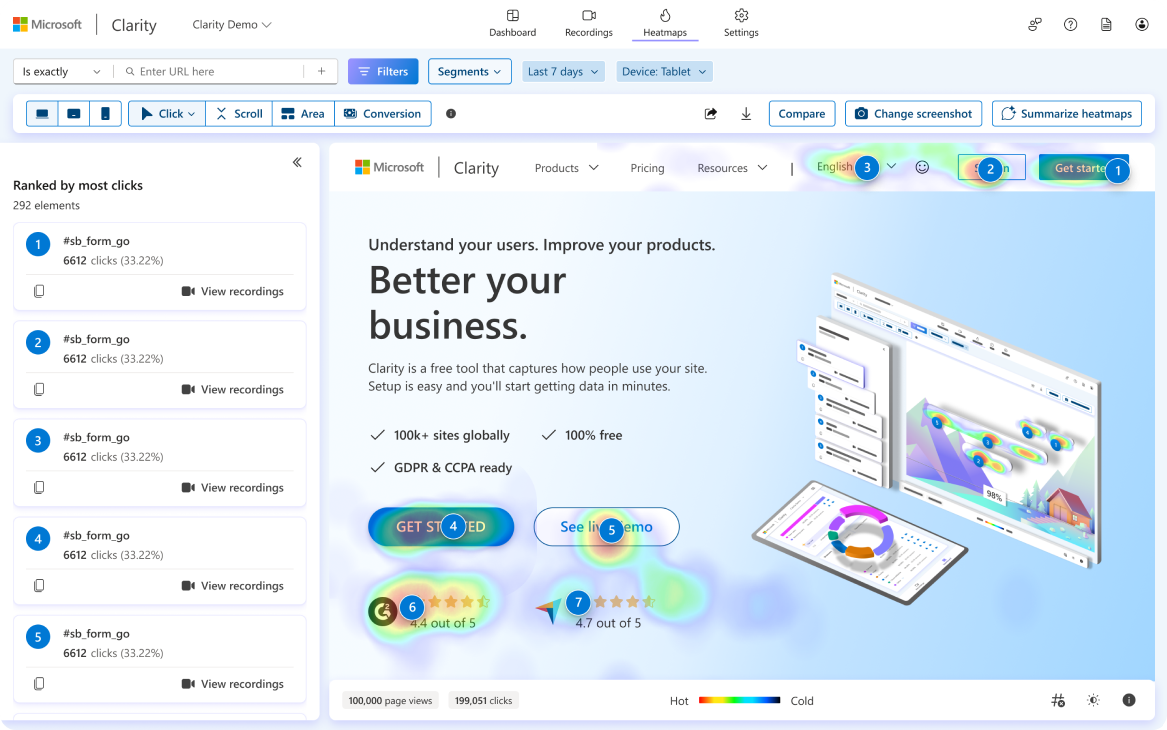
This data makes improvement actionable.
If you notice that nobody's using a particular filter, maybe it's not relevant to your buyers. If certain content consistently gets high engagement, create more like it. If people are bouncing after one article, maybe your "next steps" aren't clear enough.
The companies that get the most value from their Learning Centers are the ones that treat them as an ongoing optimization project.
If you want help building or improving yours
At IMPACT, we help businesses plan, build, and improve Learning Centers that make it easier for buyers to find answers and take the next step.
If you'd like a second set of eyes on your website, or you're ready to explore what a Learning Center could do for your business, reach out to us. We'd be happy to point you in the right direction.
And if you need a team of experts in your corner to guide you to becoming the most known and trusted brand in your market, that's exactly what the Endless Customers Coaching Program was built for. This program gives your team the tools, training, and guidance to build an in-house marketing engine, align leadership, and unify sales and marketing.

Written By
As a Web Strategist, Janet runs hands-on strategy sessions with clients to build easy-to-manage websites that not only align with their business goals but also drive real sales. She empowers her clients with the knowledge and tools they need to take ownership of their websites, ensuring they can manage and optimize them long after the launch. Janet brings a wealth of experience in project management and client relations. Her unique skill set allows her to guide clients through the complexities of web design and marketing, ensuring they achieve bottom-line results.
As a Web Strategist, Janet runs hands-on strategy sessions with clients to build easy-to-manage websites that not only align with their business goals but also drive real sales. She empowers her clients with the knowledge and tools they need to take ownership of their websites, ensuring they can manage and optimize them long after the launch. Janet brings a wealth of experience in project management and client relations. Her unique skill set allows her to guide clients through the complexities of web design and marketing, ensuring they achieve bottom-line results.
/Assets/Icon%20Library/social/linkedin-logo.svg)
Share
/Assets/Icon%20Library/social/x%20corp.svg)
/Assets/Icon%20Library/social/mail-to.svg)
/Assets/base/Learning%20Center%20Resource%20Category%20Icons/Website%20link.svg)
READY TO IMPLEMENT ENDLESS CUSTOMERS™ IN YOUR BUSINESS?
You’ve learned the philosophy. Now it’s time to put it into action. Our coaches will help you apply the Endless Customers System™ to your sales and marketing so you can build trust faster, close deals sooner, and create a steady flow of new customers.
READY TO IMPLEMENT ENDLESS CUSTOMERS™ IN YOUR BUSINESS?
You’ve learned the philosophy. Now it’s time to put it into action. Our coaches will help you apply the Endless Customers System™ to your sales and marketing so you can build trust faster, close deals sooner, and create a steady flow of new customers.