
/Assets/arrow-facing-left--black-01.svg)
/Assets/navigation-global--close-symbol-black-01-1.svg)

/Assets/Icon%20Library/social/facebook-logo.svg)

/Assets/Icon%20Library/social/instagram-logo.svg)
/Assets/Icon%20Library/social/youtube-logo.svg)





What is the first question any consumer is asking when it comes time to make a purchase or hire a professional?
Roughly, what is this going to cost me?
It’s not even about finding exact numbers. And they definitely don’t want to be sold to. They just want a ballpark figure so they can confidently make decisions about options, vendors, and timelines.
So many websites still make that question impossible to answer. If the buyer can’t get a straight answer about price, they are most likely going to leave for a company that will. The same goes for showing up in AI results when people ask about price. Hiding pricing damages buyer trust and online visibility.
A pricing calculator changes that.
It is one of the most effective self-service tools a business can put on its website, and it is often the single fastest way to generate better-qualified sales opportunities and shorten the time it takes for buyers to trust you enough to call.
At IMPACT, we’ve been coaching business owners to become the most trusted and recommended company in their market with the Endless Customers System™. Pricing transparency is one of the most powerful trust-building moves a business can make, and an estimator is one of the most practical ways to bring that to life.
If you are still deciding whether a pricing tool is the right fit for your business, start with reading The Business Case for Self-Service Tools: What to Build and Why.
Below, we will go through the step-by-step plan for building your pricing estimator from strategy to launch.
The Impact of a Pricing Calculator on Your Website
A pricing calculator does more than answer a price question. It changes how buyers experience your business before they ever talk to anyone on your team.
When someone can get a realistic sense of cost on their own terms, without scheduling a call or filling out a contact form, they show up to that first conversation differently. They are more confident, more prepared, and more ready to move forward. That is the direct connection between trust and revenue that the best businesses are building right now.
The data we see consistently backs this up. Companies that add a pricing tool to their website see more qualified leads, fewer tire-kicker conversations, and sales cycles that move faster because buyers have already done most of the research and decision-making on their own.
Take a look at some examples from real IMPACT clients using pricing calculators.
Examples of What’s Possible When Adding a Pricing Calculator on Your Website
-
Superior Trucking and Payroll: ~500%-700% growth in the number of leads per week.
-
Sportmans Boats: Created the industry’s first transparent pricing and configuration tool. Within 8 years, 65%-70% of the industry had followed suit.
-
Hoel Roofing: Doubled the number of qualified sales opportunities and met annual revenue benchmark goals in record time.
-
D’Franco Painting and Wallpaper: Leads continued to rise even while organic website traffic declined. Close rates hit 95%-100% when prospects use the calculator and/or watch a pricing video.
Focus on Pricing Ranges, Not Exact Numbers
First off, remember: a pricing calculator should give buyers a realistic range, not a precise quote. A quote is a legally binding document. An estimate is a starting point that helps a buyer decide whether to keep going through your sales process. Confusing or combining the two creates problems on both sides of the conversation.
When you show a range, your sales team keeps the flexibility to go up or down based on what they find when they talk to the customer or visit a project site. Nobody gets locked into a number, and everyone arrives at the sales call with better expectations.
Shasta Pools has a pool remodeling project pricing calculator that gives people a range that is ±20% in either direction. The cost of their services can range widely depending on what people want, but with the help of a pricing estimator, prospects can start to understand and visualize what the end cost will be.
Maybe your business is the exception, and pricing is genuinely fixed and narrow. If your formula is tight enough that an estimate and a final quote consistently land within a few dollars of each other, exact pricing can work. But for most businesses, a range is the right call, and your sales team will feel better about that too.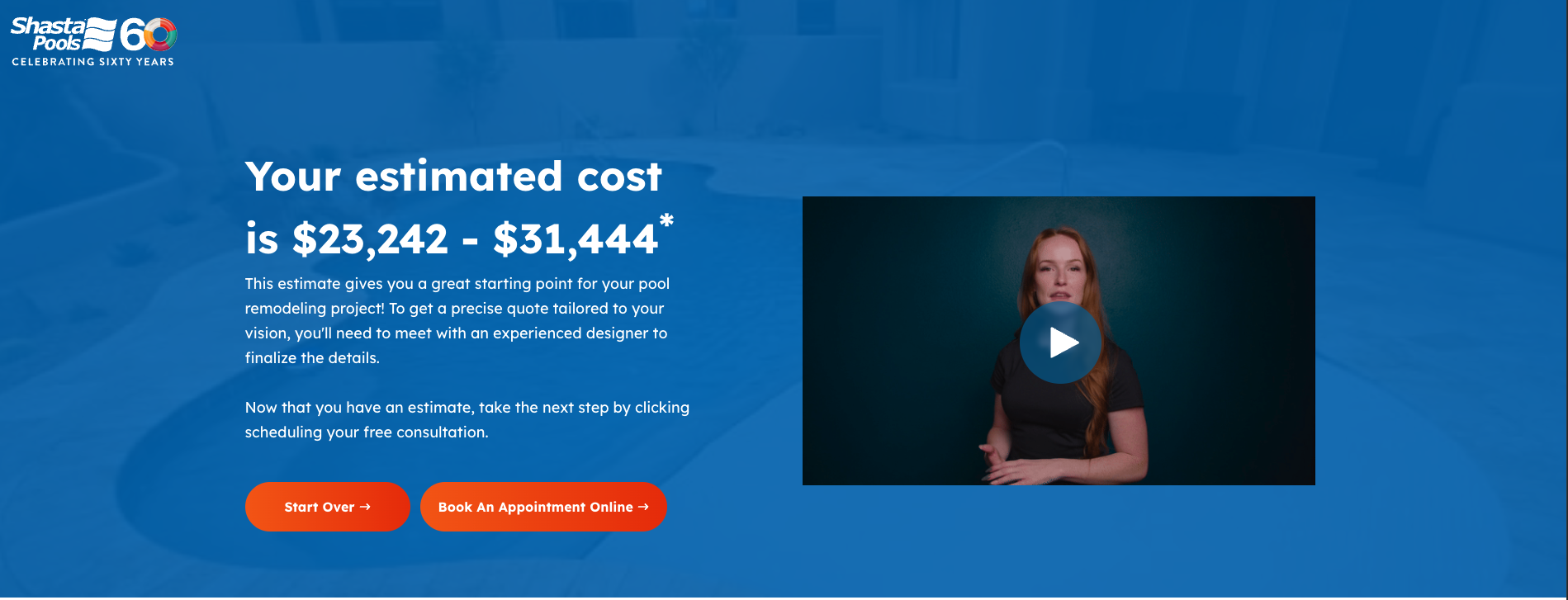
Map Your Pricing Logic Before You Start Building a Pricing Calculator
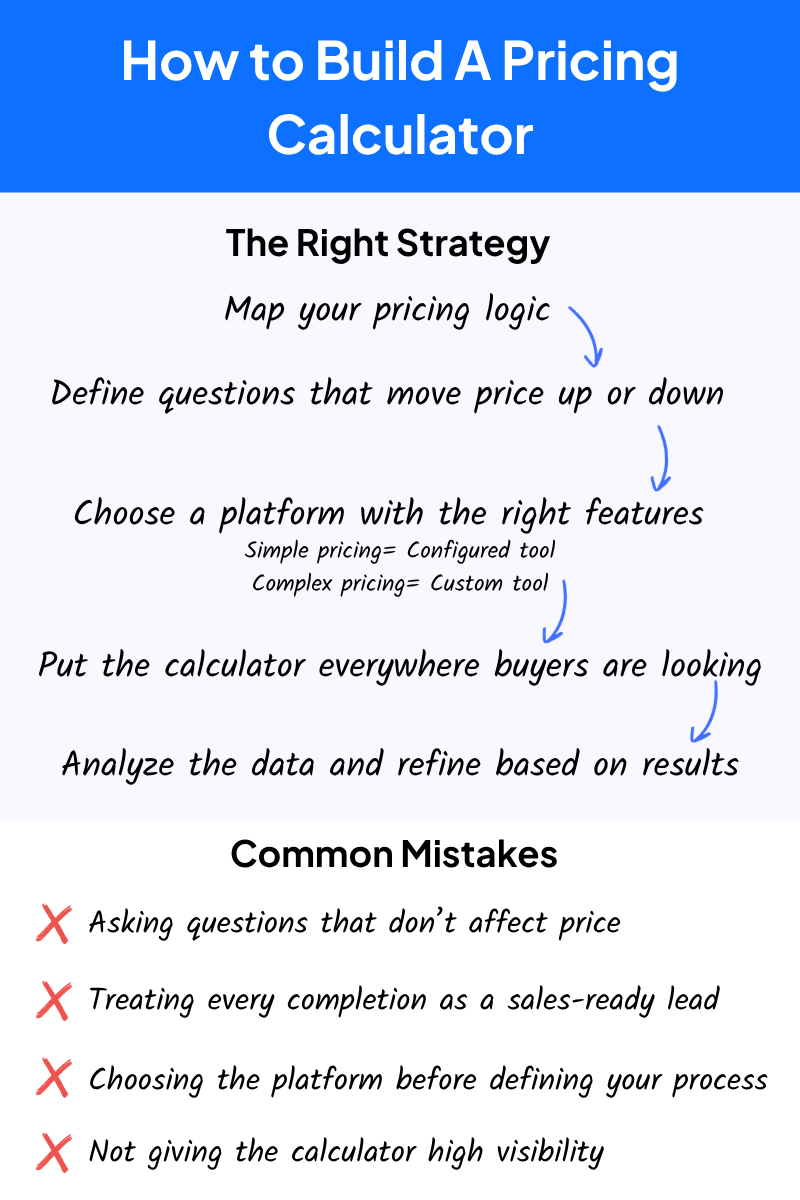
Before you write a single question for your calculator, you need a working version of your pricing formula. It doesn’t have to be perfect, but it should make sense. The more clearly you can define what drives your price up and down, the faster the build goes and the more useful the output becomes.
This is where most companies hit their first wall. They assume that because they have been pricing jobs for years, the formula is obvious. In practice, it almost never translates cleanly into a tool.
What lives in the head of an experienced estimator is usually a tangle of assumptions, exceptions, and judgment calls that need to be untangled before they can become logic a tool can follow.
Expect that process to take time and effort. It can also be a great way to improve and standardize your sales process. Get the formula on paper and walk through how your questions would branch. Identify where the exceptions live. Then build.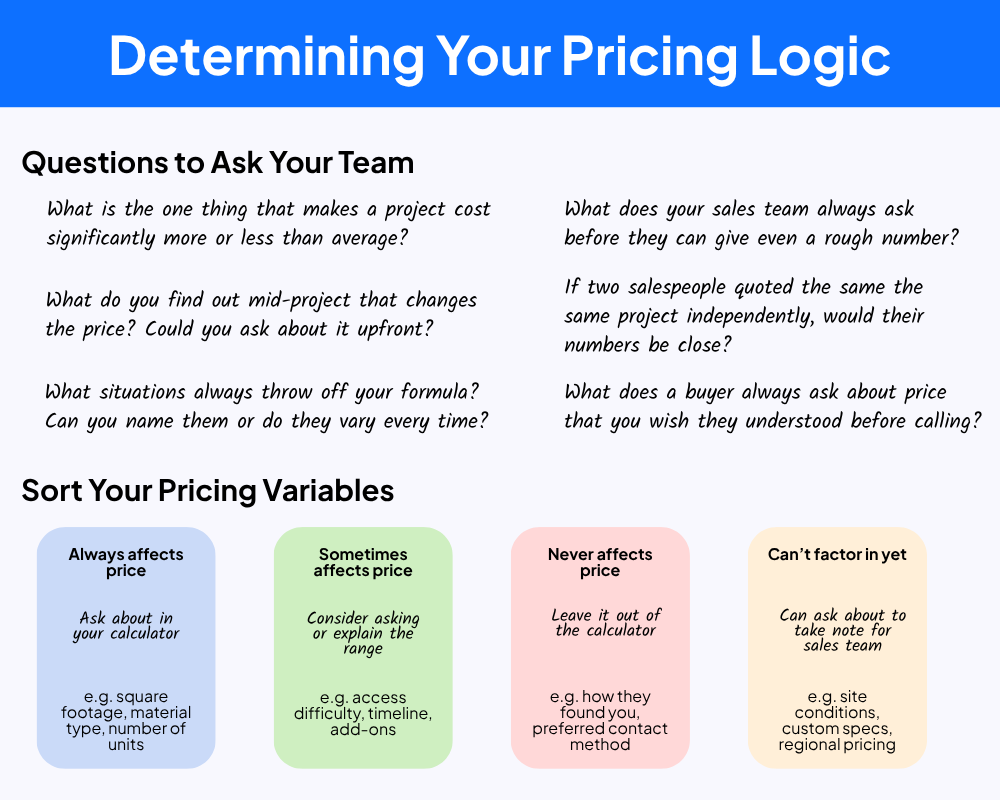
Choose the Right Platform for Your Pricing Calculator
The right platform depends on how complex your pricing logic is. For most businesses with straightforward pricing, a configured platform gets you live quickly without building from scratch.
Tools like PriceGuide, InvolveMe, ScoreApp, and Outgrow each handle different use cases well. For roofing and contractor-specific workflows, Roofr is worth evaluating. IMPACT has used several of these platforms to build pricing calculators with clients.
Where things can get complicated is branching logic. If selecting one answer leads down a completely different set of questions than selecting another, and that branching runs several layers deep, managing it inside a standard, configured platform becomes difficult. At that point, a more custom configuration gives you better control over how the tool thinks and what the results page shows the buyer.
The key thing to understand is that the platform decision should come after the strategy work, not before. A lot of companies pick a tool first and then try to force their pricing logic into it. That is backwards. Map the logic, identify where the complexity lives, and then choose the platform that can handle what you need.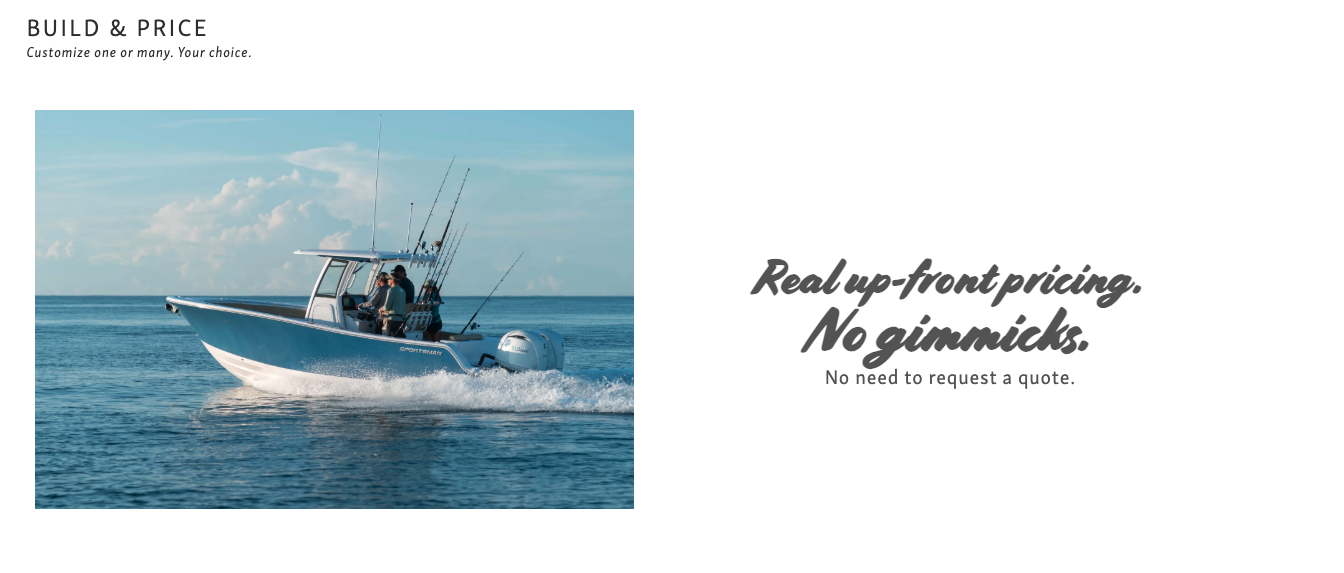
Can AI Build a Pricing Tool For Me?
It’s important to note that these tools can be even easier to build than you think. Using tools like Claude Cowork or Claude Code, you can type or talk through your process to build a functional or mock-up of your pricing tool. It’s an amazing way to break through design or process blocks and see your tool come to life.
The biggest thing here is understanding what data you’ll be able to retrieve from a tool that you vibe-coded with AI. Unless the tool integrates with your CRM and embeds on your website successfully, you won’t be able to connect the data from the pricing tool to your database.
Talk to a developer or website strategist if you are unsure if your pricing calculator will work the way it was intended.
How Hoel Roofing Built a Pricing Calculator and What Happened
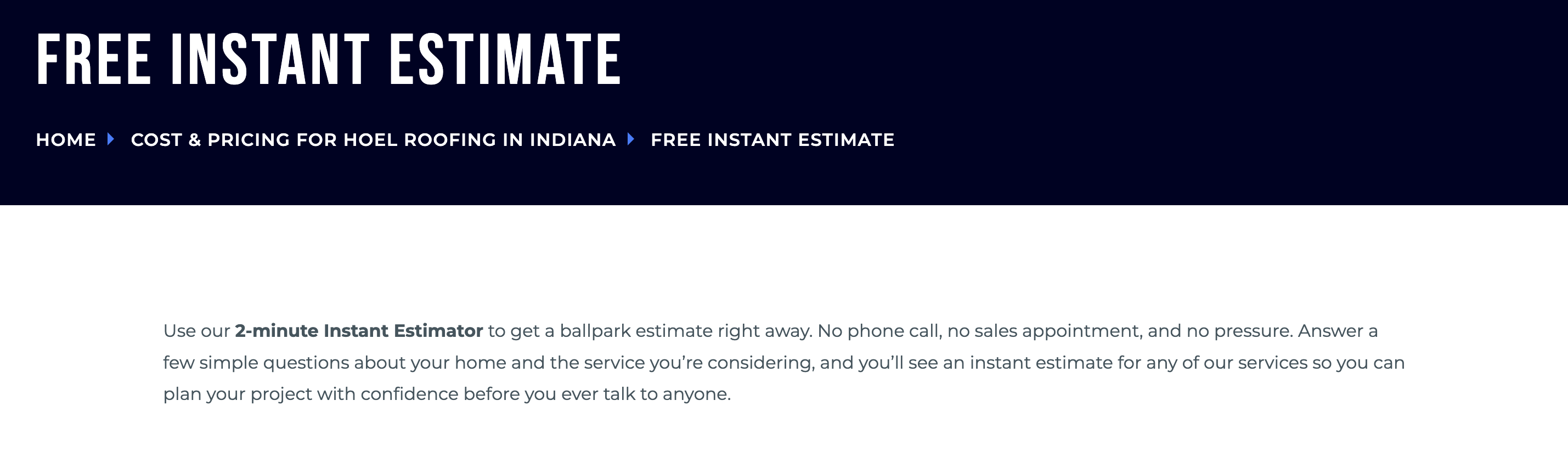
Hoel Roofing and Remodeling in Rushville, Indiana, started simple. Their first version was a metal roofing estimator. Over time, they expanded it to cover shingle roofing, siding, gutters, and windows, letting buyers price one service or combine several and get a range sent to their email.
In the 25 days after launch, it saw 93 sessions. Website leads grew from 60 in all of 2024 to 93 in 2025, and had already hit 48 in the first weeks of 2026 before the busy season started. The team set a goal of 70 leads per week during peak season. They were already hitting 80 to 90, and passed $1 million in revenue earlier in the year than ever before.
Media Director Adam Martin said buyers started arriving differently. Instead of coming in cold and uncertain, they had already worked through the tool, spent time on the site, and made up their minds. As Adam put it, buyers were saying: "We checked out your website. We learned quite a bit, and we went, okay, let's do it."
The estimator did not do that alone. It was part of a larger system of content and consistent follow-through. But it gave buyers the one thing they needed most: a way to understand cost without having to commit to a conversation first.
What Questions Should Your Pricing Calculator Ask?
Every question in your calculator should do one thing: move the price up or down. If a question does not affect the output, it does not belong. This sounds simple, but it is where a lot of companies get tripped up.
The instinct is to collect everything that might be useful. Contact information, project timeline, and how the buyer found you. Resist it. Every extra field is friction, and every question that does not affect the price signals to the buyer that this tool is really just a lead capture form dressed up as something helpful. That erodes trust before you have shown them a single number.
Ask only what you need to generate a meaningful range. Then consider one additional question: what is your timeline for a decision? Not because it affects the price, but because it tells your team how to follow up. Someone just browsing does not need a call the next morning. Understanding where a buyer is in their journey before you reach out makes the whole process better for everyone.
Where Do You Put a Pricing Calculator on Your Website?
Everywhere a buyer might be ready to use it. A pricing tool that lives on one page is not doing its job. Buyers find your site from different directions, through blog articles, service pages, search results, and social media. The tool needs to be findable no matter where they land. A strong website strategy treats your estimator as a primary conversion path.
These are just some of the top places you should have your pricing calculator:
-
Your main navigation
-
Service pages
-
High-traffic local pages
-
Articles where pricing questions are the next natural step
How you talk about your pricing calculator matters, too. Phrases like "get an instant estimate" consistently outperform "request a quote" because buyers want immediacy. They want to get something useful right now without committing to a conversation they may not be ready for.
Once it is live, you can test a small paid budget to drive traffic to the estimator page, which can show you quickly whether buyers are completing it or dropping off. That data is worth having early. It will probably take some tweaking to get your pricing calculator to where you want it to be.
What Should You Measure After Your Calculator Goes Live?
Start with page views against completion rates. If buyers are landing on the page but not finishing, something in the tool is creating friction. It could be too many questions, a confusing interface, or results that feel vague.
Completions tell you the tool is doing its job. Views without completions tell you to fix the experience. Choosing the right metrics from the start makes it much easier to know what you are actually looking at.
From completions, track how many buyers signal readiness to talk to sales. This is where the question “What is the timeline for your decision?” comes in clutch. Segment buyers who say they are ready to move soon from those still in research mode and approach them differently. One may need sales to reach out immediately, while another could move into an email workflow to nurture them for when they are ready to buy.
From there, track deals that close from estimator leads. What you are looking for over time is whether buyers who use the tool convert at a higher rate, come into conversations better prepared, or require fewer touchpoints to close. That is the signal that the tool is doing real work inside your sales process. Your core marketing KPIs should reflect this over time.
Results: What Happened After Eco Plumbers Launched Its Pricing Calculators?
Eco Plumbers generated 846 completed pricing inquiries without actively promoting the tools, and CEO Aaron Gaynor reported that roughly 30% became sold jobs.
The company started with calculators for several big-ticket services and used an existing website partner to test demand before investing in a fully custom solution.
Its biggest lesson came after launch. Estimates that did not lead to an immediate booking were initially routed to the call center, where some warm opportunities received limited follow-up. Eco corrected the process by sending completed estimates to its inside sales team. Those warm leads are becoming more and more customers.
Check out Aaron's story on the Endless Customers podcast.
Calculator activity is also shared with salespeople before appointments. Advisors can review the customer’s answers, acknowledge the estimate, and explain any conditions at the home that may change the expected range.
Early feedback suggests these buyers arrive more educated and are easier to engage, although Eco is still measuring the effect on appointment length and sales-cycle speed.
Turn Pricing Transparency Into Your Competitive Advantage
Chances are, you’ve felt the friction that comes from hiding pricing: longer sales cycles, unqualified leads, and buyers who hesitate because they don’t have enough information to move forward. A pricing calculator directly addresses that problem by giving people the clarity they’re already searching for.
What’s next? Start mapping out your own pricing logic. Before you worry about platforms or design, get clear on what actually drives your costs up and down. From there, you can explore tools, test your estimator, and begin integrating it across your site where buyers are already looking for answers.
At IMPACT, we’ve helped hundreds of businesses implement tools like this as part of the Endless Customers System™ to build trust and drive better sales conversations. If you’re ready to take that next step, learning how pricing transparency fits into your overall content strategy is the best place to start.

Learn How to Make It Happen
The Endless Customers Coaching Program
If your marketing isn’t delivering and you’re ready for a proven, future-ready system built for the age of AI (one your team can run in-house) check out our coaching program.

Written By
Vin Gaeta is an Executive Coach at IMPACT, where his work combines leadership, sales, marketing, digital strategy, and buyer behavior. He helps businesses become easier to trust, easier to buy from, and harder to ignore, especially as AI changes how people search, learn, compare, and decide. Vin works with organizations in home services, construction, manufacturing, automotive, professional services such as payroll and accounting, SaaS, and other complex B2B spaces where the buying process is long and depends on trust. His clients include TMA Small Business Accounting, Inline Plastics, CSI Accounting, HomePride, and Family Security Plan. Whether he's coaching a leadership team, improving the sales experience, rethinking a website, or shaping content strategy, his goal is to make it easier for buyers to get answers and easier for businesses to earn the right to be chosen. Outside of work, Vin is a husband and dad of two girls. He's happiest with good music on, out on a hiking trail, or deep in geek and pop culture, and he leans fully into Halloween and horror season. He takes the work seriously but tries not to take himself too seriously. Vin is available to speak on Endless Customers alignment, sales enablement, 1:1 video, Assignment Selling, and website optimization.
Vin Gaeta is an Executive Coach at IMPACT, where his work combines leadership, sales, marketing, digital strategy, and buyer behavior. He helps businesses become easier to trust, easier to buy from, and harder to ignore, especially as AI changes how people search, learn, compare, and decide. Vin works with organizations in home services, construction, manufacturing, automotive, professional services such as payroll and accounting, SaaS, and other complex B2B spaces where the buying process is long and depends on trust. His clients include TMA Small Business Accounting, Inline Plastics, CSI Accounting, HomePride, and Family Security Plan. Whether he's coaching a leadership team, improving the sales experience, rethinking a website, or shaping content strategy, his goal is to make it easier for buyers to get answers and easier for businesses to earn the right to be chosen. Outside of work, Vin is a husband and dad of two girls. He's happiest with good music on, out on a hiking trail, or deep in geek and pop culture, and he leans fully into Halloween and horror season. He takes the work seriously but tries not to take himself too seriously. Vin is available to speak on Endless Customers alignment, sales enablement, 1:1 video, Assignment Selling, and website optimization.
/Assets/Icon%20Library/social/linkedin-logo.svg)
Share
/Assets/Icon%20Library/social/x%20corp.svg)
/Assets/Icon%20Library/social/mail-to.svg)
/Assets/base/Learning%20Center%20Resource%20Category%20Icons/Website%20link.svg)
NEED HELP WITH YOUR WEBSITE?
If you’re looking to improve and optimize your website, IMPACT can help. We’ll guide you on how to structure a site that builds trust with buyers and improves conversion.
NEED HELP WITH YOUR WEBSITE?
If you’re looking to improve and optimize your website, IMPACT can help. We’ll guide you on how to structure a site that builds trust with buyers and improves conversion.