
/Assets/arrow-facing-left--black-01.svg)
/Assets/navigation-global--close-symbol-black-01-1.svg)

/Assets/base/Close.svg)


/Assets/Icon%20Library/social/facebook-logo.svg)

/Assets/Icon%20Library/social/instagram-logo.svg)
/Assets/Icon%20Library/social/youtube-logo.svg)





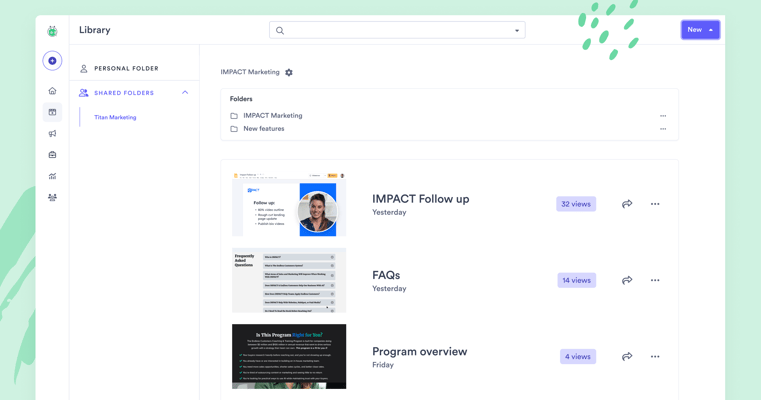
As a video sales and marketing trainer, my job is to empower companies to embrace and utilize video not just in their communication with prospects and existing customers but also in creating a culture of video within the organization.
This isn’t just providing lists of recommended equipment (although I have covered that already here); it also includes recommendations for software and additional platform tools to enhance the culture of video in the organization.
Especially after 2020, business leaders and marketers should know that video isn't optional. It's how you break through the noise. Today, video makes up roughly 80%+ of all internet traffic, making it one of the dominant ways buyers consume information online.
🔎 Related resources:
- What is virtual selling? (definition + examples)
- Ultimate guide to video for sales
- Your ultimate video sales call checklist
However, this post isn’t about why video is a must. Instead, we're here to talk about Vidyard. Vidyard is one of the most popular AI-powered video platforms leveraged by over 100,000 marketing and sales teams around the world to create, send, and track video messages that drive pipeline and revenue.
But how much does Vidyard cost? And is it worth it? Let's dig in.
First, what is Vidyard?
Vidyard (a partner of IMPACT’s) is a video hosting and video creation platform that helps businesses tie ROI back to their video content.
It does this by integrating with a variety of CRM and marketing automation tools (including HubSpot) to provide metrics on how video influences lead quality, pipeline, and customer engagement. Pretty cool.
Beyond CRM platforms, Vidyard integrates with a wide range of sales engagement tools that revenue teams already live in every day (tools like Salesloft, Outreach, Apollo, and Gong). This means your team can record and send videos directly from the platforms they're already using to prospect and manage deals. No switching tools. No extra steps.
Vidyard has a single product for hosting and sharing. Using this platform, videos can be put on pages of your website, on landing pages, or even in emails.
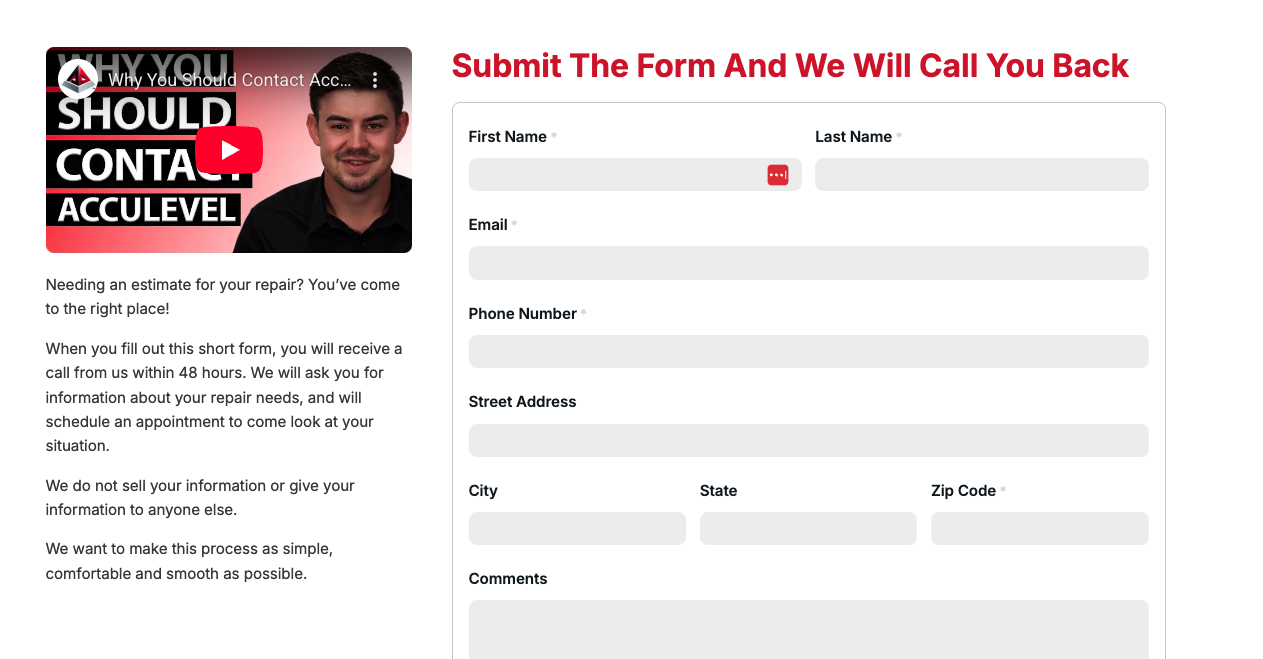
This example from IMPACT client Acculevel uses the Vidyard video player to host their landing page video with a custom thumbnail that addresses what the video is about and is placed next to the form on their website to Request a Quote.
It also allows you to record and create one-to-one and one-many videos that will allow you to develop that personalized communication with your customers and build a video communication structure with your team.
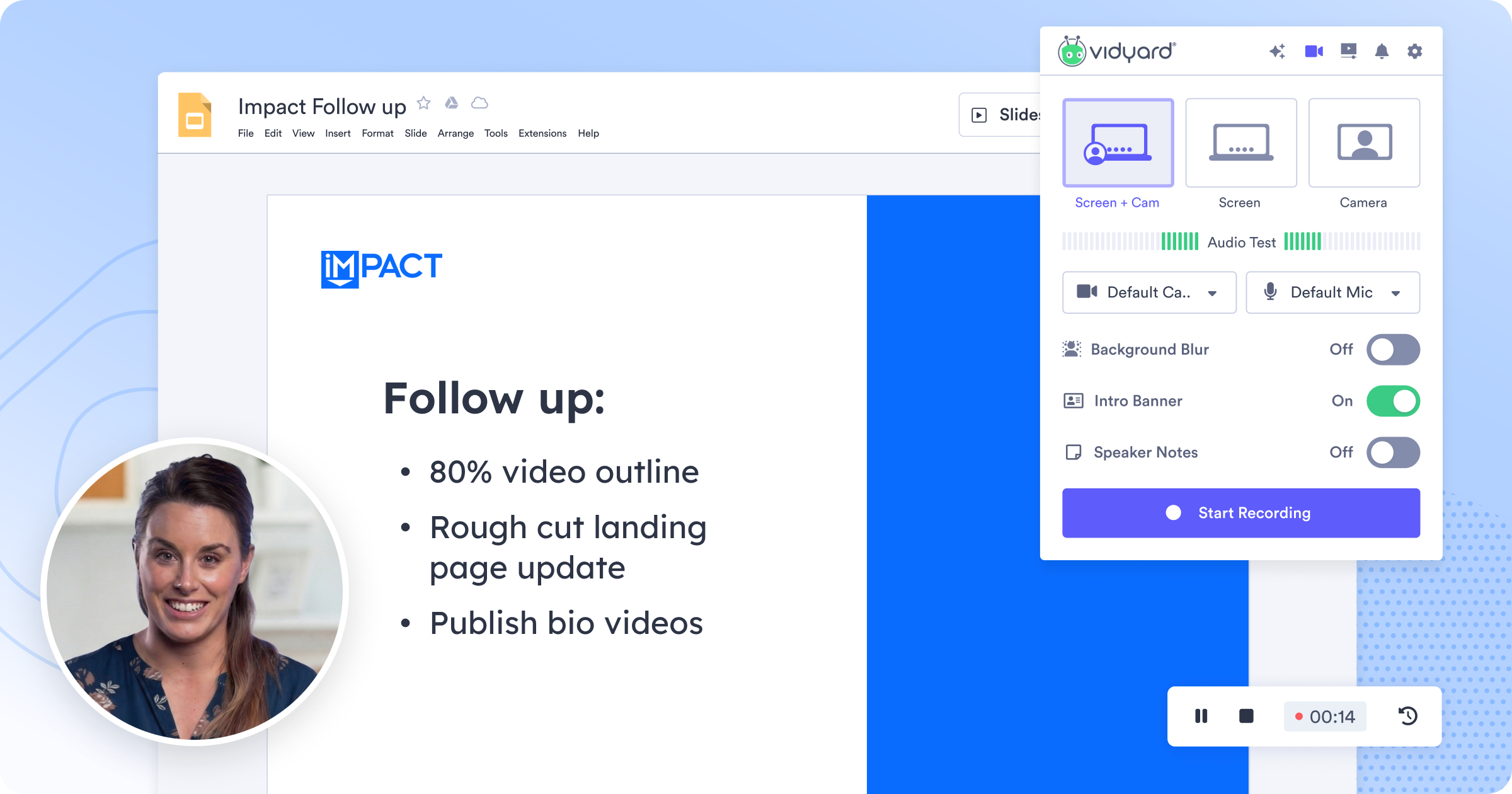
Using the Vidyard browser extension, I record follow-up videos (like the one above) to send to clients after a meeting. I use the notes section above the video to keep me on track with what I need to reiterate, and the countdown clock to make sure I’m smiling before recording starts.
How much does Vidyard cost?
On Vidyard’s pricing page, there are options for both individuals and teams to choose from.
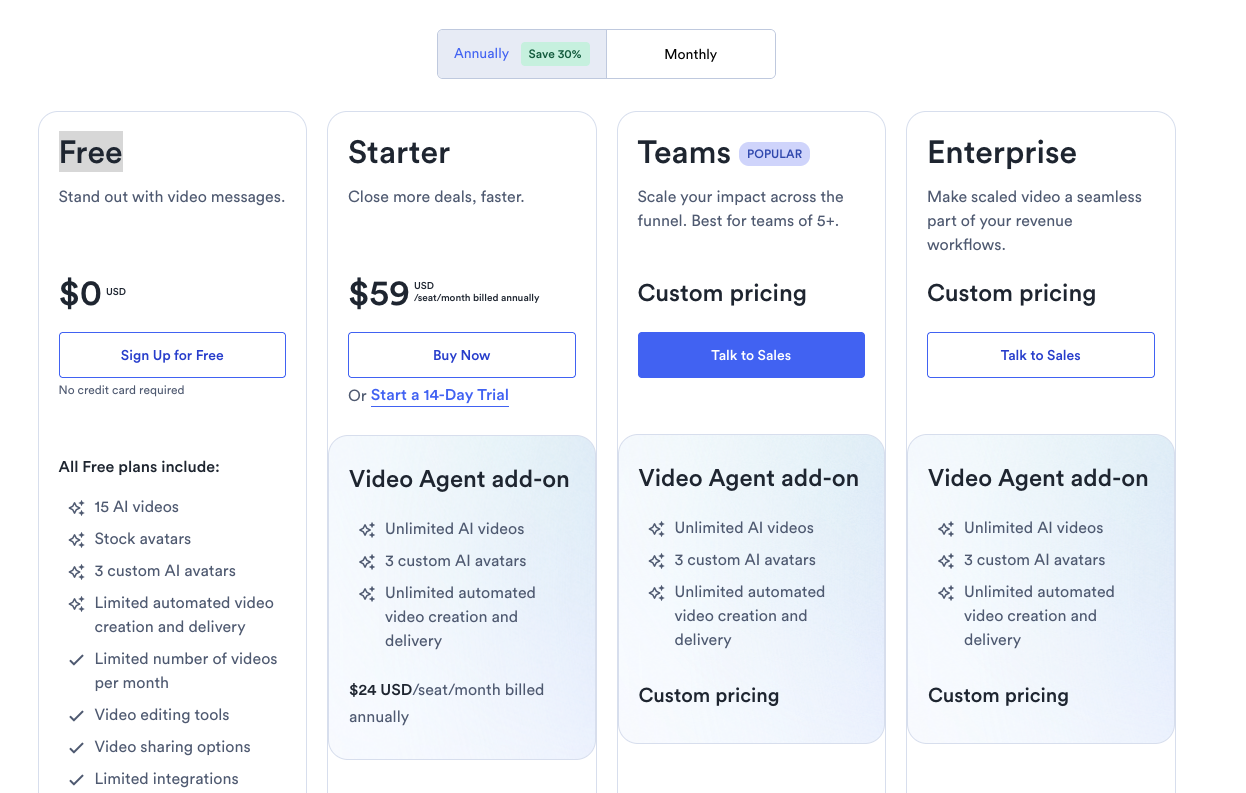
With all of the options available, it can be difficult to break down which choice is the best for your team. Let’s dive in, so by the end of this article, you’ll have an idea of which of these solutions is best for you.
Vidyard Free
If you’re getting started with video, Vidyard Free is a great way to test both video messaging and AI-powered video creation. It’s ideal for individuals or small teams looking to experiment with one-to-one video and basic AI workflows, before scaling to more advanced features.
Features
With this option, you can record and share videos using your webcam or screen, host videos, and generate shareable links for easy distribution. Users on this option also have the experience of being able to share links and publish videos to social media.
While this is great for starting out, if you’re looking to customize your video experience and give it the look and feel of your own brand, you'll run into limited customizations. If you want the full branding experience, like custom landing pages, you'll want to go with a paid plan.
Who is this a good fit for?
The free version of this platform is a good fit for individuals or small teams just getting started with video, especially those using it for one-to-one communication, prospecting, or internal messaging.
If you're looking for a fully branded experience with deeper customization, integrations, and reporting, you'll quickly outgrow the free plan.
Vidyard Starter
If you've moved past just experimenting with video and want to start using it more consistently in your sales or marketing, Vidyard's Starter plan is the next step up.
Starter begins at $59 per user per month and is designed for individuals or small teams who want more control, better insights, and a more polished video experience.
Features
Along with all the features that are included in the Free tier, the Starter plan's biggest addition is unlimited video recording (no monthly cap, no time limits), making it a far more practical option for anyone using video consistently in their day-to-day sales or marketing workflows.
You also get full video analytics and team performance analytics so you can start understanding what content is actually driving engagement. Pair that with a branded sharing page, and your videos start to feel like a natural extension of your brand.
Basic CTAs are also included, so you can prompt viewers to take the next step without ever leaving the video.
If deep CRM integration is a priority, note that while Vidyard connects with tools like HubSpot, Salesforce, and Marketo on Starter plans, full data syncing and advanced integrations are only available on higher-tier plans.
Who is this a good fit for?
If you're an individual or part of a small team that's serious about using video in your sales process, marketing efforts, or customer communication, this is where Vidyard starts to shine.
It's a strong fit if you want that branded look to your videos and you care how people interact with them.
That said, if you have multiple users, need deeper reporting, or want video fully integrated into your CRM and sales workflows, you'll likely run into limitations pretty quickly and need to look at higher-tier plans.
Vidyard for Teams
Once you have multiple people using video across your sales or marketing teams, you're going to outgrow the lower tiers pretty quickly.
Vidyard's Teams plan is built for that next stage. Pricing is custom, so you'll need to talk to their team, but this is where the platform starts to support real team-wide adoption.
Features
Including everything that's in the Starter plan, the Teams tier is designed for collaboration and consistency across multiple users. The big addition at this tier is CRM and marketing automation integrations, meaning video engagement data flows directly into the tools your team is already using to manage pipeline and measure performance.
You'll have better organization with shared folders and team management tools, which makes it easier to keep content aligned and accessible. You'll also get more robust analytics, giving you a clear picture of how videos are performing across your team.
You also get fully customizable CTAs, giving you complete control over what happens after someone watches your video.
Who is this a good fit for?
This is a good fit for teams that have multiple users actively using video, and they want to bring some structure and consistency to how it's being used.
If you've got sales reps, marketers, or customer-facing team members all creating and sharing videos, and you want some visibility into performance across the board, this is where Vidyard for Teams makes sense.
But, if you're looking for deep integration with your CRM and tech stack or advanced automation, you'll need to take a look at Vidyard Enterprise.
Vidyard Enterprise
At the highest level, Vidyard's Enterprise tier is built for organizations that want video fully integrated into their sales, marketing, and customer experience.
Pricing is custom and typically designed around the size of your team, your tech stack, and how deeply you plan to use video across the business.
Features
This is where Vidyard starts connecting with your broader tech stack. You can integrate with unlimited CRM and marketing automation tools, giving you visibility into how video engagement ties back to your sales pipeline and revenue.
You’ll also get advanced reporting, automation, and controls to manage video across a larger team, along with enterprise-grade security features like SSO.
Who is it a good fit for?
This is a good fit for companies already using a CRM like HubSpot or Salesforce, and are all in on using video across the customer journey.
This is not a good fit for companies that do not have a designated CRM.
Who should use Vidyard?
Simply put, it’s for companies that want to know if they’re enhancing their marketing and sales processes with video. Marketing, sales, customer success, and even internal communications teams can all benefit from using Vidyard.
Let’s dig a little deeper into how:
Sales teams
There are many use cases for video in sales.
We’ve found that Vidyard’s clients use it mostly for one-to-one prospect and client outreach. They also use it to effectively follow up on meetings and recap difficult-to-grasp concepts about products or services.
Vidyard client, Miovision, confirms this, saying that using Vidyard has helped streamline the complexity of their sales process.
Reps use video to summarize a call, outline action steps, and describe how a process or feature of their product works. Account Executive Scott Dolson says, “It eliminates confusion and helps (potential) customers see the value."
Similarly, the company’s Deputy Global Revenue Operations Manager, Keith Jones has said,
“I feel like today if I were to take Vidyard out of the stack, it would be like taking a limb away from our sales reps. It is such an integral way for our team to stand out from the competition. I wouldn’t do that to them, it’s too important to the sales process. Noting that video is helping convert trials into customers and is one of the biggest weapons in their arsenal.”
But follow-up is not the only reason sales teams have found success with Vidyard. Client 1Huddle’s sales team has sent 45,455 videos via email, which has led to a 68% email open rate from prospects and a 12% reply rate.
Another client, Igloo, has their sales team use video to introduce clients to their Customer Success team, which allows people to put faces to names more quickly, which helps build trust throughout the hand-off process.
Marketing teams
Marketing teams, on the other hand, love Vidyard because it actually makes video trackable.
That’s right.
There is no guessing on whether or not video effectively impacts revenue. It can all be tracked in real-time and connected to marketing automation platforms so that data can be used to trigger workflows or other campaigns.
When used to help promote a brand new conference for marketing professionals, Cassandra Jowett, Senior Content Marketing Manager of Influtive says,
“We couldn’t just tell them Advocamp was the best conference ever. We had to show them... We had to make them feel something. We had to convert. We had to change our strategy if we hoped to come even close to our goal, so we started investigating ways to make an engaging medium like video turn into an ROI-driving, seat-filling tactic.”
By using Vidyard personalization, she saw an 800% increase in click-through rates.
Video also helps marketing teams at all stages of the funnel, Matt Trushinski, Director of Marketing at Miovision, says, “No matter what path a prospect might take, we have a piece of video content custom-tailored for that purpose.”
Matt also mentions that video has helped his team stand out from its competition and create brand recognition. It’s also driving familiarity with sales prospects by putting faces to names.
Putting faces to names with prospects and clients is a huge asset. Think about this.
Let’s say your team is headed to an event and you send some pre-event videos. It takes the awkwardness of introducing yourself to someone or vice versa off the table because they’re already a friendly, familiar face, which shortens the time to connect and get engaged in the sales process.
Client success and support
Imagine a world where all support questions and answers were in the form of video. How much better would that experience be?
That’s what Vidyard enables client success and support teams to do; create knowledge bases, reduce the amount of tickets, respond to FAQs, and open up success and support capacity.
Brent Rogerson leads a team of success managers at Miovision.
Their business is high touch and given the nature of it, clients demand a high level of attention. So, Brent needed to be creative and find efficiency to solve for capacity.
Video is “...an efficient way to create a warm touch with a customer while minimizing logistical effort.”
Understanding his customers are busy too, he added,
“You can’t expect them to find half an hour or an hour in their schedule to meet with you. This way, I can flip them a five minute video they can watch and digest on their timeline, and we can follow up with a quick phone call. We’re getting our message through but not creating an interruption in their day.”
Brent estimates he’s increased his capacity 400% by using video.
Internal communications
I’ve never spoken with a single manager or leader at an organization that’s said, “Our internal communications couldn’t get any better.” In fact, most organizations admit they need better internal communications.
Vidyard allows you to securely store company content and be a host to training materials and general company communications that are actually engaging. Who wants to read 1,000 words in a wiki post or Slack channel? (Not me! And not most of you.)
Igloo has been successful at increasing employee engagement using Vidyard. Like many companies, they are growing fast.
They’ve got employees spread throughout buildings and employees who are located remotely. Determined not to let communication challenges get in their way, they use video to make a visual connection with employees, no matter where they are located, to talk through company updates.
They strive to make what could have been a boring memo or email announcement more exciting by leveraging the Vidyard platform. It’s not uncommon for the organization to interview employees and executives in the videos they sent out to their staff to emphasize the company's mission, vision, and values as well as product strategy and marketing approach.
The common thread I see across all of the use cases here is that video helps organizations build trust at all levels, internally and externally. Sure, there are other video tools out there that you could use. Wistia is another common video hosting platform some choose to use.
YouTube is another common option.
Learn more: Vidyard vs. YouTube: Which One Is Right for Your Business? [Video]
As you’ll read below, the Vidyard platform is one that can be used at all stages of a business' maturity, and the costs can grow with you as you need more robust features. It’s the additional features and functionality of Vidyard, as it compares to YouTube and Wistia that make the product completely worth it.
Why Vidyard is worth the cost
There are a lot of tools out there that can help with your video selling and marketing strategy. But Vidyard allows you to streamline this process and put all of your videos in a single spot.
From a selling perspective, sales teams who have never thought about using videos before can jump right in and start recording videos. They can as easily send these videos to prospects to create a more human connection.
On the marketing side, having the ability to control the funnel of videos on your website is key to providing a seamless viewing experience. Platforms like YouTube are great for setting up your own channel, but when it comes to your website, you don’t have control over what is shown next, for example.
What Vidyard isn’t
It’s important to remember that Vidyard is a tool, not a strategy. You might be reading this thinking about all the great things you could do with video if you sign up and start paying for Vidyard.
And that’s great, but there is more work that needs to be done than just signing a contract with Vidyard to get started and then forgetting to use the platform you’re invested in. To make this worth it for your business, you have to be committed to video.
So if you’re considering Vidyard, but aren’t sure how you’re going to create enough video content to make it worth the investment, consider first hiring a videographer. We have a lot of great resources to help you get started with this process:
- How to hire an in-house videographer
- When hiring a videographer, look for soft skills [Interview]
- Is hiring a videographer for my company's digital marketing worth the cost?
- Videographer hiring playbook
To be committed to video, that means someone within your organization must own the process of conceptualizing, creating, and reporting on the content. The person to own this within the companies I work with is the in-house videographer.
Not only does this person own the process, this is a great person to have on staff to help coach those team members who are unsure about how to produce great 1-1 or 1-many video content.
Working with Vidyard
At IMPACT, we’re an education-first company, and we also practice what we preach. Vidyard is committed to education through the resources they provide in their blog and on their YouTube channel.
Video can seem like a daunting undertaking for a company who has never experienced it before. But the key to success is aligning your company by making video a vital part of your team culture. Vidyard is a tool that makes video accessible to everyone in your organization.
You’re in the driver’s seat for your video sales and marketing efforts. Add a tool like Vidyard to your toolbox to help generate the results you want to see.

Share
/Assets/Icon%20Library/social/linkedin-logo.svg)
/Assets/Icon%20Library/social/x%20corp.svg)
/Assets/Icon%20Library/social/mail-to.svg)
/Assets/base/Learning%20Center%20Resource%20Category%20Icons/Website%20link.svg)
NEED HELP WITH VIDEO MARKETING?
If you’re looking to take control of your sales and marketing using video as a key driver, IMPACT can help. We can guide you on how to build your internal team, stop relying on agencies, and become the most known and trusted brand in your market.
NEED HELP WITH VIDEO MARKETING?
If you’re looking to take control of your sales and marketing using video as a key driver, IMPACT can help. We can guide you on how to build your internal team, stop relying on agencies, and become the most known and trusted brand in your market.