











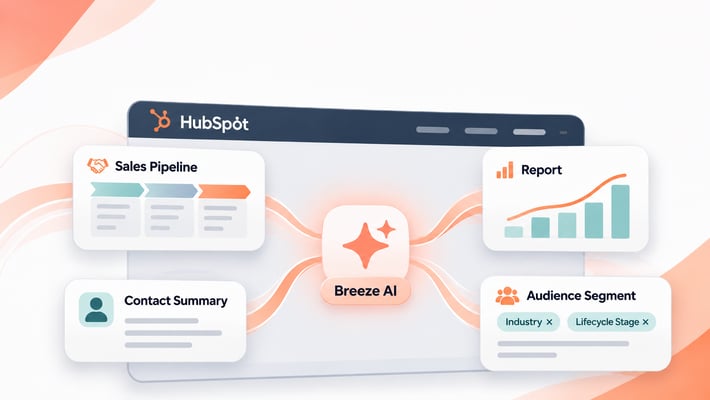
HubSpot has added more AI to your account this year than most teams can keep up with. There's an Agent Hub, a rebuilt Breeze Assistant, and new agents that plan campaigns and rewrite emails.
You're paying for all of it, so you want something back, but you don't want your team spending a month on features that go nowhere.
At IMPACT, we've worked alongside HubSpot for 15 years, and the Right Technology is one of the five components of the Endless Customers System™. We coach companies to use AI where it helps buyers and the sales team, and how to get the most out of their HubSpot subscription.
Below, you'll learn what Breeze includes, why HubSpot itself is being selective about AI, how to choose between an agent and a workflow, which agents to test first, and what Breeze needs to know about your business.
What is HubSpot Breeze?
HubSpot Breeze is the AI built into HubSpot. It includes Breeze Assistant, a chat tool that answers questions and takes action in your account, and Breeze agents, which each handle a specific job, like planning a campaign. You build and manage agents in Agent Hub, which now also includes HubSpot's new workflow builder.
If you use HubSpot's standard navigation, Agent Hub has its own spot in the menu. If your team has customized the navigation, type "Agent Hub" into the search bar at the top, or ask Breeze Assistant where it is.

What to use Breeze for in HubSpot
Breeze works like any other LLM AI (ChatGPT, Claude, Gemini). You can casually chat with it inside your HubSpot portal.
What makes it so much more efficient is the context that it already has about your business. It can quickly summarize deals, contact records, reports, and workflows, and make updates where you need them.
If you haven't spent much time exploring Breeze, start by asking it to help with something you would normally do manually inside HubSpot. Here are a few prompts to try:
-
Get a pulse on your sales pipeline: "Give me an overview of our open deals this quarter. Which deals are stalled or at risk of not closing?"
-
Prepare for a sales call: "Summarize my interactions with this contact, including previous conversations, emails, and outstanding action items."
-
Analyze marketing performance: "Which marketing emails generated the most engagement over the last 90 days, and what do they have in common?"
-
Build a custom report: "Create a report showing closed-won revenue by sales rep for the last six months."
-
Create a targeted nurture segment: "Create an active segment of contacts who visited our pricing page in the last 30 days but don't have an open deal."
-
Uncover missed sales opportunities: "Identify open deals worth more than $10,000 that haven't had any sales activity in the last 30 days."
-
Visualize your CRM data: "Create a bar chart showing how many new contacts we've generated each month this year, broken down by original traffic source."
-
Troubleshoot a workflow: "Help me understand why this contact didn't enroll in this workflow."
-
Personalize sales follow-up: "Based on this contact's previous conversations and activity, draft a personalized follow-up email that addresses their outstanding questions."
Each of these examples helps you put the data you already have in HubSpot to work without spending time manually digging through records, configuring filters, or analyzing reports
Why is HubSpot being selective about AI?
HubSpot is being selective because its own research shows that more AI doesn't produce better results. Only a small share of companies using AI see a real positive return, and the return for those few is large. So at Unbound 2026, its annual conference, HubSpot put three or four new agents on the main stage.
Behind the scenes, HubSpot still shipped hundreds of updates, and many had nothing to do with AI: data structure changes, ease-of-use fixes, and interface updates.
Kyle Jepson, a HubSpot evangelist who teaches through HubSpot Academy and covers every new update for HubSpot users, puts it plainly: HubSpot is not distracted by AI. It's choosing the specific places where AI helps its customers most.
Your team can take the same approach. Pick a few jobs where AI clearly helps, set those up well, and keep using the tools you already trust for everything else.
When should you use an agent instead of a workflow?
Use an agent when the work needs analysis or creativity, and use a workflow when a process has to run the same way every time. Inside Agent Hub, the Create button asks which one you want, and HubSpot's help text gives that same rule. Updating a property or recording a form submission belongs in a workflow.
The difference matters because an agent reasons through each task, so it will sometimes try something new. A workflow follows if-this-then-that logic and does exactly what you set up. An agent might run a fixed process correctly 99 times, then decide to try a different approach on the 100th, and that one run can break everything downstream.
So the test for each new agent is whether it takes on work your team avoids or adds something you couldn't do before. If a job already runs well by hand or in a workflow, keep it there.
Which Breeze agents should you try first?
Try an agent first on work your team avoids or never has time for. Campaign Agent and Nurture Agent, both announced at Unbound 2026, are good first tests for marketing teams. As of October 2026, both are in public beta for Marketing Hub Professional and Enterprise, and both use your HubSpot data to fit their output to your business.
Campaign Agent
Campaign Agent builds a campaign plan inside Marketing Studio, HubSpot's shared visual board for mapping out ads, forms, emails, and how they connect. Tell Breeze your goal ("We're hosting a webinar. How do we promote it?") and it asks follow-up questions, then lays out the assets. Upload a well-written brief, and it may skip the questions and start building.
It's best for the person who doesn't know where to start with a campaign. If someone on your team loves planning campaigns and does it well, let them keep building by hand in Marketing Studio.
Nurture Agent
Nurture Agent takes a marketing email you've already built and writes a personalized version for each contact, based on what's in their CRM record. Marketers have always wanted to give every buyer that kind of attention and never had the hours to do it.
The early evidence is thin, so experiment carefully. One HubSpot user reported a 39% increase in email engagement after using Nurture Agent. But that's a single account. Treat it as a reason to run your own test before you build plans around it.
What does Breeze need to know about your business?
Breeze needs the same basics a new salesperson would: who your customers are, what you sell and why buyers pick you, who you're a good and bad fit for, and how you sell. You record those in the Context tab inside Agent Hub, and every agent and Breeze Assistant prompt draws on them.
The Context tab is useful even if you never turn on an agent, because sales and marketing end up with one written description of the customer inside the CRM. If ChatGPT or Claude already knows your business, ask it for a first draft, then have both teams edit it together.

How do you test a Breeze agent before buyers see it?
Test every agent on real records before it touches a live send. With Nurture Agent, testing doesn't use HubSpot credits, so you can preview its edits for 5, 10, or 20 contacts at no cost. Keep reviewing until you trust what it writes, then turn it on for a single email.
The biggest risk with personalization is an email that tells a buyer you've been watching them. Nobody wants a message that mentions how many times they visited your privacy policy page. Here's how to test for that before it happens:
- Build the email in the email editor as usual, then choose the option to optimize it with Nurture Agent.
- Pick a contact. The agent shows its suggested edits on top of your base email, with removed text crossed out, the way suggestions appear in a Google Doc.
- Choose which contact properties it can reference. Leave out anything you wouldn't want quoted back to a buyer, like page-view counts or internal notes.
- Lock the modules it shouldn't touch, such as legal-approved fine print at the bottom.
- Review 5 to 20 contacts from different segments, and toggle data sources on and off to see how the output changes.
- Send to a small segment first, and compare engagement against the version without personalization.
Leave the greeting, the body copy, and the CTA text open to the agent. Those are the parts that benefit most from fitting the person reading them.
Should you use Breeze or connect ChatGPT or Claude to HubSpot?
The biggest advantage of Breeze is that it's built directly into HubSpot, where your customer data, tools, and workflows already live. Connecting HubSpot to an external AI tool like Claude or ChatGPT becomes particularly valuable when you want to work across multiple data sources, conduct deeper research, or create something outside of HubSpot.
Here's how that might look in practice:
|
Task |
Better with Breeze |
Better with Claude or ChatGPT + HubSpot connector |
|---|---|---|
|
Reporting |
Build a report in HubSpot that tracks monthly revenue by lead source. |
Combine HubSpot, Google Analytics, and advertising data to create a comprehensive marketing performance report. |
|
Sales pipeline |
Get a quick overview of your pipeline and identify deals that need attention. |
Analyze historical deal data to identify patterns among your most profitable customers. |
|
Audience segmentation |
Build an active segment of contacts who are ready for a re-engagement campaign. |
Analyze customer characteristics, buying behaviors, and market research to develop new buyer personas. |
|
Marketing automation |
Build a workflow that enrolls qualified leads into a nurture campaign. |
Develop a comprehensive lead nurture strategy, including messaging, timing, and content recommendations. |
|
Sales enablement |
Summarize a contact record and prepare for an upcoming sales meeting. |
Analyze sales conversations and industry research to develop a sales playbook. |
|
Content marketing |
Generate a marketing email or landing page copy directly within HubSpot's editor. |
Combine customer insights, sales conversations, keyword research, and competitive analysis to build a content strategy. |
|
Customer service |
Summarize a support ticket and recommend next steps. |
Analyze recurring customer complaints alongside product documentation to recommend business improvements. |
|
Business planning |
Get a quick snapshot of your team's performance against CRM goals. |
Combine CRM data, financial projections, and industry trends to develop a quarterly business plan. |
|
Prospecting |
Research a company and prepare personalized outreach from within HubSpot. |
Conduct extensive market research to identify new industries or customer segments worth pursuing. |
There is considerable overlap between these tools. Both Breeze and external AI connectors can analyze CRM data, generate content, and perform certain CRM actions. Breeze can also access supported external apps and files.
A simple rule of thumb: If the task starts and ends inside HubSpot, start with Breeze. If HubSpot data is one piece of a larger project that requires multiple information sources, extensive research, or a deliverable outside of HubSpot, consider using Claude or ChatGPT with a connector.
These are recommended starting points rather than exclusive capabilities. Specific functionality will depend on your subscriptions, permissions, and connected applications.
Hear Kyle Jepson on where to start with HubSpot's AI
Kyle Jepson, one of the best-known teachers at HubSpot Academy, sat down with Bob Ruffolo live at Endless Customers Live in Chicago to walk through Agent Hub, the two new agents, and the HubSpot features he's watching for 2027.
Frequently asked questions
What do HubSpot's Breeze agents cost?
Many agents use HubSpot credits. As of October 2026, Nurture Agent uses 10 credits per email sent (about $0.10), Campaign Agent uses none on its own, and each asset created through Content Agent uses 1,000 credits (about $10). Testing an agent before you send doesn't use credits. Check your credit balance and HubSpot's current pricing before you roll an agent out widely.
Which HubSpot plans include Agent Hub?
Agent Hub is available on every hub at the Starter level and above. Campaign Agent and Nurture Agent are in public beta for Marketing Hub Professional and Enterprise.
Is HubSpot only building AI features now?
No, HubSpot still ships updates every week that have nothing to do with AI, from data structure changes to small improvements on CRM index pages, like zebra striping and drag-to-select cells. One newer feature to watch is work management, which lets you build Airtable-style tables inside HubSpot and connect them to your CRM data, down to details like deal splits.
Use AI in a few places, and test it first
The best place to start with HubSpot Breeze is a short list: one or two jobs where an agent clearly helps, with everything else left to the workflows and tools you already trust.
Use an agent where the work needs judgment and a workflow where it has to run the same way every time. Test Campaign Agent or Nurture Agent on real contacts before buyers see the output, give Breeze your business context, and use Breeze for anything that touches your CRM.
IMPACT has worked with HubSpot for 15 years and has coached more than 300 companies through the Endless Customers System, including how to set up HubSpot so sales and marketing work from the same information.
If you want help deciding which HubSpot AI features fit your team, setting up Breeze, or training your team on the new agents, talk with IMPACT's HubSpot training team.
Related reading
- HubSpot Training for Sales and Marketing Teams in 2026 lays out IMPACT's HubSpot training options for sales and marketing teams.
- Using AI for Marketing covers what to use, what to skip, and what to measure with AI.
- Why HubSpot Is the CRM of Choice for the Endless Customers Journey explains why IMPACT recommends HubSpot for the Endless Customers System.
- Sales Process Optimization helps you document the sales methodology your Context tab needs.

Written By
Jessica Palmeri is Director of HubSpot Training at IMPACT, where she helps companies drive day-to-day HubSpot adoption by teaching their teams to use the tools well. Jessica has been a HubSpot Certified Trainer since 2019 and has run more than 1,000 HubSpot training sessions since then. She follows a teach-a-team-to-fish approach because she's seen that lasting user adoption comes from training people to understand the tools they use every day. Her clients are most often in professional services, finance and accounting, home services, construction, and manufacturing. On a typical day, Jessica works inside clients' HubSpot portals, acts as the system administrator for IMPACT's own portal, and helps colleagues troubleshoot HubSpot issues. She also meets with people at HubSpot corporate to stay current on product development and where the platform is headed. One of her best-documented wins is Kaplan, whose HubSpot training success story IMPACT featured in a video at IMPACT Live in April 2024. Jessica speaks online and in person at webinars, workshops, small group trainings, and podcasts. Her topics include train-the-trainer adoption models and training sales and customer service teams to use HubSpot.
Jessica Palmeri is Director of HubSpot Training at IMPACT, where she helps companies drive day-to-day HubSpot adoption by teaching their teams to use the tools well. Jessica has been a HubSpot Certified Trainer since 2019 and has run more than 1,000 HubSpot training sessions since then. She follows a teach-a-team-to-fish approach because she's seen that lasting user adoption comes from training people to understand the tools they use every day. Her clients are most often in professional services, finance and accounting, home services, construction, and manufacturing. On a typical day, Jessica works inside clients' HubSpot portals, acts as the system administrator for IMPACT's own portal, and helps colleagues troubleshoot HubSpot issues. She also meets with people at HubSpot corporate to stay current on product development and where the platform is headed. One of her best-documented wins is Kaplan, whose HubSpot training success story IMPACT featured in a video at IMPACT Live in April 2024. Jessica speaks online and in person at webinars, workshops, small group trainings, and podcasts. Her topics include train-the-trainer adoption models and training sales and customer service teams to use HubSpot.

Share




NEED HELP THRIVING WITH HUBSPOT?
If you’re looking optimized your sales and marketing using HubSpot, IMPACT can help. We’ll help audit your current stack, guide you to a firm foundation, and train your team to drive real results.
NEED HELP THRIVING WITH HUBSPOT?
If you’re looking optimized your sales and marketing using HubSpot, IMPACT can help. We’ll help audit your current stack, guide you to a firm foundation, and train your team to drive real results.