ec_bg_left
How to Build AI Content Workflows Your Whole Team Will Use Live Workshop June 30 at 11am ET How to Build AI Content Workflows Live Workshop June 30 at 11am ET Register Now
Close Hello Bar Banner
ec_bg_right
Self-Service Tools

Building a Self-Service Tool With IMPACT

Today's buyers expect to navigate the buying process on their own terms, without a salesperson. Self-service tools make that possible. Configurators, pricing calculators, and interactive assessments give your prospects real answers in real time, so they arrive at the sales conversation already educated, already confident, and already sold on whether you're the right fit.

Overview

Why Self-Service Tools Are a Must-Have for Today's Buyer

For years, the standard website playbook looked like this: offer a PDF, a checklist, or a guide, and ask for an email address in return. Today's buyers want real value before they hand over their information.

Self-service tools deliver that. They allow prospects to move through the buying journey on their own terms, self-qualify without having to talk to anyone, and show up to sales conversations already informed and invested. Your team stops chasing bad-fit leads while your buyers stop feeling sold to. Everyone wins.

The Five Types of Self-Service Tools

Self-Assessment-1

Self-Assessment

Think quizzes or scorecards that allow buyers to assess their needs and challenges. They provide personalized insights and recommendations.
Self-Selection-1

Self-Selection

These tools ask targeted questions to guide prospects to their ideal solution, building trust through personalized recommendations rather than overwhelming them with options.
Self-Configurator-1

Self-Configurator

Allow buyers to personalize and configure options, turning abstract possibilities into concrete plans and deepening their investment in the outcome.
Self-Scheduling-1

Self-Scheduling

Remove the back-and-forth of scheduling. Streamline the process, create a frictionless experience, and even allow prospects to choose the team member they want to meet.
Self-Pricing-1

Self-Pricing

Pricing calculators and estimators give buyers the transparency they crave. By providing ranges or estimates, these tools set clear expectations, establish trust, and move buyers closer to a purchase decision.

If you want to learn about the individual types of self-service tools and see more examples, check out our resource, the Business Case for Self-Service Tools.

"IMPACT guided me every step of the way...

We even built our first interactive tool! Their support helped turn something scary into something measurable, functional, and exciting. I can't wait to see what we build next."

Is building a self-service tool right for your business?

Self-service tools work for almost every type of business. The real question isn’t whether there’s a tool for you, it’s whether you’re set up to get the most out of it.

Strong Fit Signals

gradient-checkmark

Your buyers typically research, compare options, and take time to decide before committing.

gradient-checkmark

Lead quality is a problem, not lead volume. You’re getting inquiries, but too many are unqualified or not ready to buy.

gradient-checkmark

You want to help buyers self-educate and self-qualify before they ever talk to a salesperson.

gradient-checkmark

Your sales team is willing to adopt the tool and adjust how they sell once it’s live.

gradient-checkmark

You can clearly document how you calculate pricing, recommendations, or configurations, even if it needs pressure-testing.

Not the Right Time

red_x_close

Your website doesn’t have meaningful traffic yet. A tool converts existing demand; it doesn’t create it.

red_x_close

Your sales team isn’t on board, or would undermine the tool in conversations with prospects.

red_x_close

You don’t own or have access to your website environment (especially if an agency controls everything and isn’t collaborative).

red_x_close

Your branding is actively in flux, or a rebrand is planned right after launch.

red_x_close

Your pricing logic or decision rules aren’t documented or are too complex to map cleanly.

Two keys for self-service tool success

These two things will help you get the most out of our engagement and your tool post-launch. 

Website

Website Access

If another agency currently manages your website, you can still build a self-service tool with IMPACT. We just need to know if you have access to your website environment and have insight into your current agency relationship. 

We've worked with plenty of great agencies, and the work runs smoothly.

Occasionally, agencies are not collaborative, which creates obstacles for our team. It can be overcome, but it can affect the timeline, scope, and effort. 

Sales-Training

Sales Adoption

Self-service tools aren't meant to replace the sales team. They are meant to create better fit opportunities for them to do their best work.

The teams that see the biggest results treat the tool as part of their sales process, not separate from it. They reference it in calls, walk through it with prospects who haven't used it yet, and use it as a shared starting point. 

That's where the time to close actually shortens. 

Process

How We Work Together

Here’s what to expect from your first contact through ongoing partnership.

01

Strategy Session

The work starts with a self-contained three-hour strategy session, plus some prep and follow-up work on both sides.

This is where the tool gets structured before anyone designs or builds anything. The goal is to map the logic of the tool, because that logic is what determines scope, timeline, and cost.

In the session, we work through:

  • The questions the tool will ask and the outcomes it needs to produce
  • The decision rules behind it: what answers show or hide certain questions, what inputs change a recommendation or price range
  • Where the tool should live on your site, how it should be positioned, and how the handoff works when someone finishes

Come in with whatever you have documented around how you currently calculate your ranges or recommendations. Even if you feel confident in what you have, expect that we will pressure test it. Most teams discover edge cases, missing inputs, or assumptions that don’t hold once everything is mapped out. Working through that early keeps the project from stalling later.

The strategy session is a paid, standalone step. It’s designed to give you clarity on what the tool should do and what it will take to build it. It’s not a guarantee that IMPACT will be the team building the final version.

02

Internal Evaluation and Recommendation

After the strategy session, our team meets internally to evaluate what we learned and determine the best path forward. We typically spend one to two weeks reviewing options, and by week three or four, we come back to you with a clear recommendation and next steps.

This is where we determine whether your tool can be built on an existing platform, needs a custom build, or whether multiple approaches are worth putting on the table. Options might include:

  • An existing platform such as PriceGuide AI, Involve.me, or ScoreApp
  • A build inside your current website environment
  • A build on a subdomain using our own framework

These can vary significantly in price. In some cases, building inside your current website environment is the most expensive route, so having options matters.

Occasionally, we come back and determine that we are not the right team to build the tool directly. This usually happens when the logic is highly complex or when the rules and calculations are not yet documented in a way that supports development.

When that happens, there are two paths forward: we can consult with your internal developer to make sure the tool gets built the right way, or we can encourage you to spend more time refining and documenting your logic before coming back to explore a build with us. 

03

Agreement and Build

If you want to move forward, we issue a second agreement, it gets executed, and then we start design and build based on the recommendation.

If it’s a platform-based tool, our strategist builds the tool inside the platform we agree on. You own everything, which means you set up the account and logins, we get access, and we build it inside your environment so you control it.

If it’s custom, the work moves into development based on what was scoped in the strategy phase. This is where you start to get your hands dirty. The tool still needs your voice, your details, and your inputs to make the experience feel real and usable for a buyer.

On your side, you own the content. That means writing the copy, sourcing images, and creating the results page content and other core pieces that a buyer will see after they complete the tool.

If you already have content ready before we build, we’ll happily put it in. If you don’t, your team is responsible for the content population with our guidance and resources.

04

QA and Launch

Once the tool is built, the goal is to make sure it behaves the way it was designed to behave before any real buyers touch it. It’s the pressure test that confirms the question flow is working, the logic is doing what it’s supposed to do, and the outcomes a buyer sees are accurate.

Most tools go through two to three rounds of QA. IMPACT tests first, then your team gets time to test it as well, and then we revise based on what we find. Then we run it again. How many rounds you need depends on the size and complexity of the tool. If everything gets caught early, the launch can happen earlier.

Once QA is complete and everyone is confident in how the tool is performing, it’s time to launch.

05

After Launch: How to Leverage Your Tool

Once the tool is live, the build is complete, but a self-service tool only works if buyers can find it.

After launch, we talk through how to maximize the use of your tool. Most often, that means calling it out in places on your site that already get attention. For example, we can consider any or all of the following:

  • Home page header
  • Main navigation
  • Pricing pages
  • High-traffic blogs
  • Service pages

This is also where sales adoption shows up again. Some buyers will use the tool before they ever reach out. Some won’t. Either way, your sales team should be ready to reference it in conversations and, when it makes sense, pull it up and walk through it with a prospect. That’s how the tool stays connected to revenue, not just engagement.

From there, the ongoing job is execution. Get it in the right places on the website, use it as part of the sales process, and let the tool do what it’s designed to do: educate, qualify, and improve the conversations that turn leads into customers.

Project Timelines

Platform-based Tool One month for strategy, one to two months for build and testing
2-3 months
Custom Tool One month for strategy, more complex build, and testing
4-6 months
Complex Custom Builds Highly complex logic, extensive integrations, or multiple tools built together
6+ months

The two biggest factors that protect your timeline are keeping your logic stable after the strategy session and getting your content and assets completed on schedule. When either one slips, the build slips with it. 

PRICING

Pricing

Our full range for a Self-Service Tool build is $25,000 to $155,000. That's wide because different scopes are different projects. Here's how to narrow it down to what you need.

Strategy Session

$3,000

Depending on what comes out of your strategy session, multiple approaches and price options may be put on the table moving forward, like out-of-the-box tools or custom-built tools.

Key questions identified to collect the right information to give us the insight to provide the right recommendations
Educational points identified for the your team to work on
Results and logic mapped out based on questions
Wishlist of items for scoping
Clear next steps for development of the tool

Most Popular

Out-of-the-Box Tools

$5K–$12K


Choose from third-party tool platforms or IMPACT's self-assessment module

Use platforms like PriceGuide AI, Involve.me, Outgrow, or Score App
Configured to match brand style
Integrated into CRM

Custom tools

$15K–$70K

Same brand configuration and CRM integrations, but also...

Implementation of more complex logic
More flexibility for customization

What could drive the cost up

Two things drive the cost of a self-service tool more than anything else: the complexity of the logic and the scope of any integration work. 

Complexity of the logic

Complexity of logic is about how much the tool has to think. It’s the number of questions, how many paths a buyer can go down, what needs to show or hide based on answers, and how many inputs change the final outcome. A simple self-assessment can often be done out of the box. Pricing and configurator tools tend to push more custom work because there are more variables, more edge cases, and more rules that have to be accurate.

That’s why a configurator with 50,000 options is a completely different build than a configurator with 15 options. The size of the data and the amount of decision logic change what has to be built, tested, and maintained.

Example:
A roofing company configurator where a homeowner selects material, slope, square footage, and add-ons, and the tool has to sort through thousands of combinations to return an accurate price range. More variables mean more logic to build, more edge cases to account for, and more rounds of QA to catch errors.  

Integrations

If the tool needs to connect to your CRM or other systems, that adds scope. It's doable, but it requires planning because integration is rarely straightforward. The payoff is that leads and data flow directly into the platforms your team already uses, rather than sitting in a spreadsheet waiting for someone to act.

Example:
A completed assessment automatically creates a contact record in your CRM, assigns it to the right rep based on location, and triggers a follow-up sequence. Ready to work the moment it comes in.

Already on HubSpot? No extra integration work needed. 

Multiple tools

If you want to build more than one self-service tool, your strategy session may be able to cover multiple tools. Here’s how to make that work:

Come prepared with ideas, concepts, and an idea of what each tool needs to be able to do.

You’ll save money on an additional strategy session, but building more than one tool will still cost more than building one.

Results

Real Self-Service Tools in Action

Featured Example

Energy Swing Windows

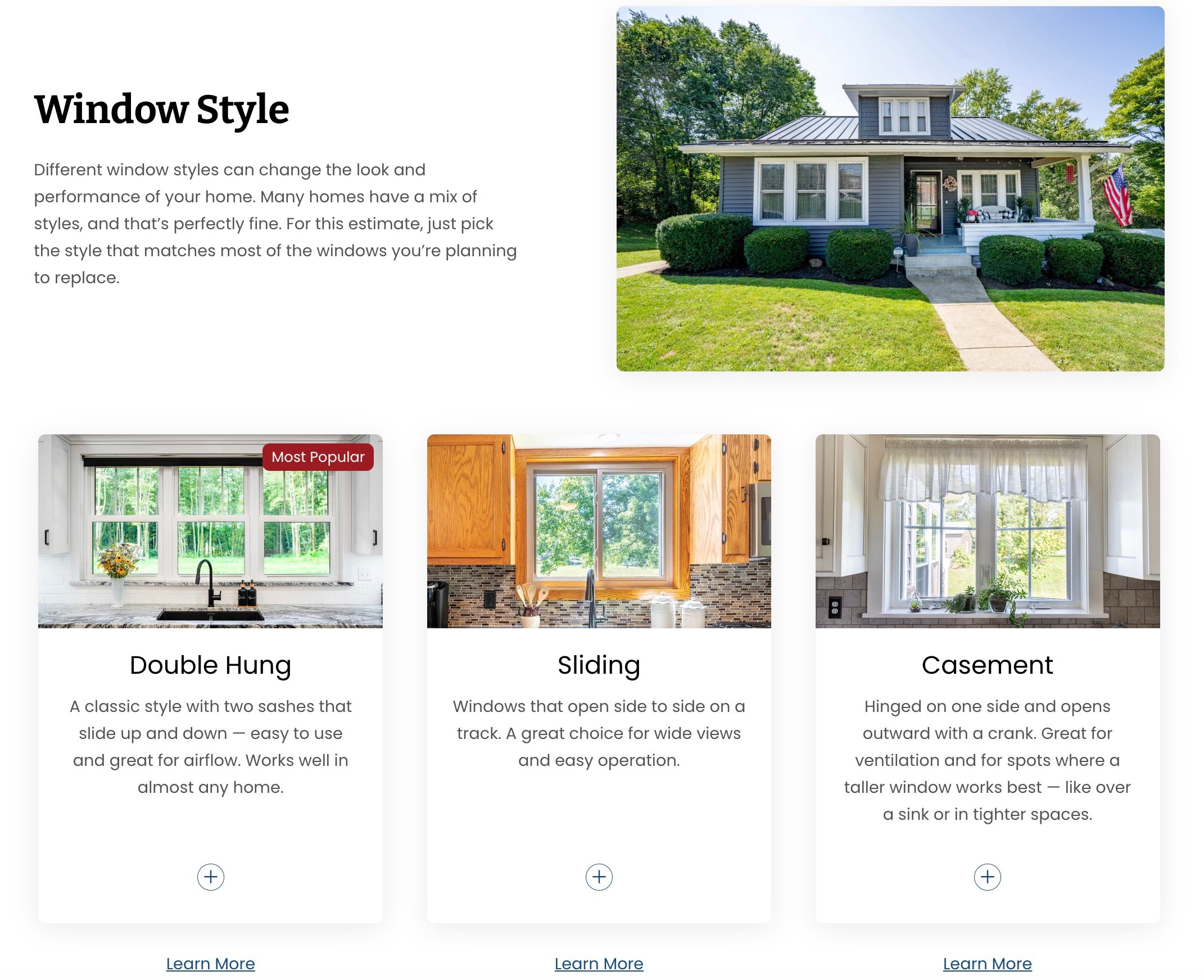
By putting two pricing tools on their website, Energy Swing Windows and Doors gave buyers in Pennsylvania the ability to explore options and get a real sense of cost before they ever picked up the phone. The result was a pipeline full of buyers who already understood the investment and were ready to move forward.

Their tools converted at 16% each, nearly double the industry benchmark for a standard web form. On a total investment of around $33,000, they attributed $800,000 in revenue directly to the tools. That’s a 23x ROI.

Now their pricing tools work around the clock, qualifying buyers before sales ever enters the conversation. 
Energy Swing Pricing Calculator Selection

Key Stats

16% conversion rate
$800K in attributed revenue
23x ROI
Featured Example

Shasta Pools

Shasta Pools, a Phoenix-based pool builder, partnered with IMPACT to give buyers clarity earlier in the process. Rather than waiting until after a long consultation to talk about pricing (the industry's standard approach), Shasta's pricing tool helps customers explore their choices and understand the cost range as they build. It works as both a self-configurator and a pricing calculator in one experience.

The tool is built to guide the buyer through a simple, nine-step experience. A prospect can choose pool shape, finishes, water features, decking, and more. Along the way, the tool provides explanations, images, and videos for each option, so buyers understand what they’re selecting. In practice, it mirrors the flow of a real sales appointment, but it lets the buyer move at their own pace and show up to the conversation more prepared.

The early results were clear. Shortly after launch, more than half of all first appointments being scheduled involved customers who had used the pricing calculator.

A tool like this doesn’t just speed up the sales process. It creates peace of mind for buyers making a big, permanent investment, and it helps the sales team spend their time with people who are informed, serious, and closer to a decision.
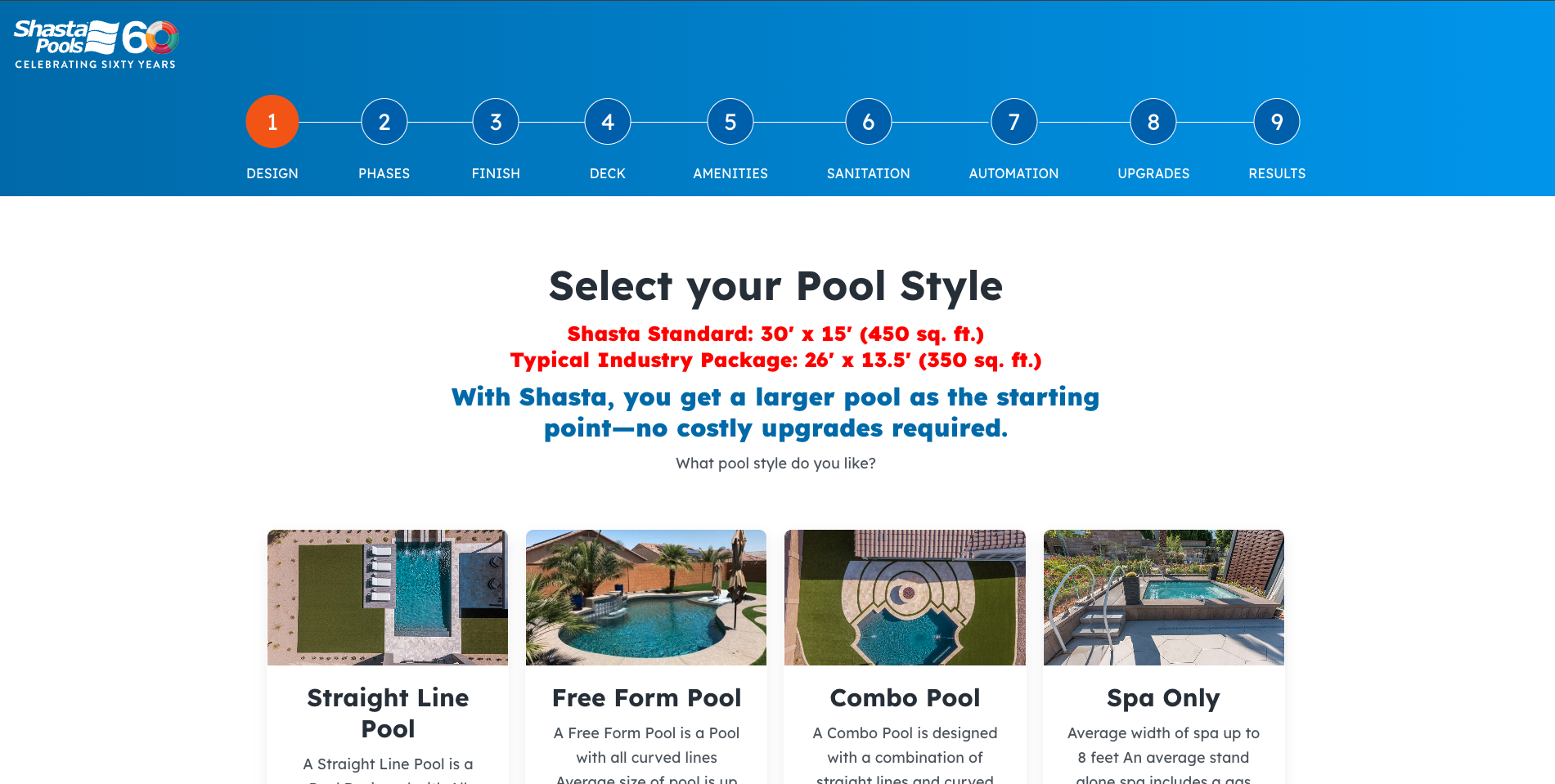
Screenshot 2026-06-26 at 11.09.31 AM

Key Stats

$6M+ attributed revenue
107+ new customers
$300K page views
FAQS

A Few More Questions We Hear Often

What is a self-service tool?

Will this replace my sales team or hurt my reps?

What happens if we want to add or change the tool after it launches?

How much involvement is required from our team during the build?

How do we know if the tool is working?

What is the biggest misconception about self-service tools?

Fewer Wasted Appointments. Shorter Sales Cycles.

A self-service tool gives your prospects a way to understand their options and get a sense of investment all before the first sales conversation. The result is a full pipeline ready to buy.

If you're tired of your sales team wasting time educating bad-fit leads, book a call and we'll help you figure out whether a self-service tool is right for your business.