









How do you use AI to build a content calendar?
Give AI your website, your keyword research, and The Big 5, then let it draft the calendar while your team makes the judgment calls. IMPACT coach Mandy York uses a Claude skill that reads a company's services from its homepage, matches them to scored keywords, and returns a ready-to-paste list of cost, problems, best of, comparison, and review articles. What used to take a multi-day brainstorm now comes down to four steps: research, organize, run the skill, and schedule.
What you'll learn:
- Why the old content brainstorm breaks down, and the four-step process that replaces it
- How to add a Claude skill to your account and use it to build a content calendar from a homepage URL
- A simple scoring system for deciding which keywords are worth going after
- Why a content calendar is not a content strategy, and the expertise, timing, and optimization lenses that close the gap
- How to use the same skill to outline articles, prep subject matter experts, and choose the right CTA
- How to stress test your content with AI before and after you publish
Resources
Everything Mandy used during the session, all in one place.
From Mandy
- Open the resource folder with the content calendar template, the content calendar Claude skill, a live example calendar, and Mandy's full list of Claude skills
What you need to build your own calendar
- A Claude account and a Google Drive account
- Semrush or another keyword tool (optional, for the keyword step)
Mandy York, an Endless Customers coach at IMPACT, led this session, and IMPACT's Stephanie Baiocchi hosted. Mandy first ran this workshop at Endless Customers Live, where the room filled up and the questions ran past the time limit. Attendees all wanted to know the same thing: how is the way we plan and create content changing now that AI is part of the process?
What was wrong with the old way of planning content?
The traditional Endless Customers approach started with a content brainstorm. Sales, leadership, and marketing sat in a room and listed the questions buyers ask. Marketing then organized that list, did keyword research, assigned a subject matter expert (SME) to each topic, scheduled an interview, and built an outline. Every article was a multi-day process.
It worked, and marketing teams have run that way for decades. But it had friction at every step:
- Salespeople didn't always understand what kind of questions they were supposed to contribute.
- Marketing came back later unsure what a salesperson meant by a half-written idea.
- When an SME wasn't available, the whole article stalled.
Mandy's version cuts the process down to four steps: research, organize, run the skill, and schedule. How much SME scheduling you still need depends on your industry. A medical, education, or regulated company may still need heavy SME involvement. An HVAC or roofing company may only need a quick email that says, "I couldn't find information online about this. Can you answer these questions for me?"
What does the content calendar look like?
When Mandy starts with a new client, she builds a first version of the content calendar before their first meeting, without the client involved. Then she hands it over to refine, so they start ahead of the starting line.
The template has these columns:
- Service type: the company's service lines, usually the dropdowns in the website's main navigation
- Title: the working article title
- Content type: Big 5 content in this case, though it also works for Selling 7 videos or other sales enablement content
- Medium: written, video, and so on
- Buyer's journey stage
- Status
Mandy's example throughout the session was TLC, a client that does lawn irrigation, sprinklers, outdoor lighting, drainage, and other landscaping services. If you use the template from the resource folder, make a copy rather than editing the original.
How do you add the content calendar skill to Claude?
The skill in the resource folder is built for Claude. Mandy's take: if you're only going to pick one AI tool, Claude is the most versatile and the easiest to use.
A skill is a set of instructions that makes Claude do the same task the same way every time. To add one:
- Download the skill file from the resource folder.
- In Claude, click the plus sign, then go to Skills and Manage Skills.
- Click Add in the top right and drag in the file you downloaded.
Once it's in your account, it's yours. Changes you make won't affect Mandy's copy, and changes she makes won't reach yours. You can edit it however you like, and later in the session she suggested a few changes worth making.
How does the skill turn a URL into a content calendar?
Start a conversation with "Build my content calendar for" followed by your website URL. The skill is interactive by design. Mandy doesn't believe AI should do every step for you, so it pauses for your input along the way.
- It researches the business. The skill pulls the services from your site navigation, looks for competitors, and summarizes what it found. For TLC, it returned irrigation, outdoor lighting, yard drainage, gutter cleaning, Christmas lighting, and garage floor coating.
- You do the keyword research. The skill tells you to research keywords for each service, then send the results back.
- It applies The Big 5. The skill matches your services to your keywords and writes titles for cost, problems, best of, comparisons, and reviews content for each service. This step takes a few minutes the first time because it creates several of each for every service.
- You paste the table into your calendar. The output is a table in the same column order as the template, with every row marked "to do." Click copy, paste it into your calendar, clean up the dropdowns, and delete the extra header rows.
How do you decide which keywords are worth going after?
Keyword research is where most people at Endless Customers Live got stuck, and it's a topic of some debate inside IMPACT. Some people now ask AI to suggest keywords directly. Mandy is firmly in the camp that keyword research still matters, because you need to understand intent and how people actually search.
She uses Semrush. If you have about $120 a month in your budget, it does a lot more than keyword research. If you're just starting out, asking Claude for keywords will get you most of the way without the detailed data.
Her Semrush workflow:
- Enter a seed keyword for one service, like "irrigation," to get a list of variations.
- Use the settings gear to show only intent, volume, and difficulty.
- Check the keywords that would make good content, like irrigation system, irrigation repair, and drip irrigation, and copy them.
- Paste them into the keyword research calculator tab in the template.
The calculator scores each keyword out of 25 so you don't have to weigh volume against difficulty against intent in your head:
- Intent: commercial and transactional keywords score higher than informational or navigational ones, because people who search them most often end up spending money.
- Volume: more than 5,000 searches a month earns 10 points, more than 1,000 earns 8, and so on down.
- Difficulty: a difficulty score under 10 earns 10 points, and the points drop as difficulty rises.
A keyword that scores 21 out of 25 is a better bet than one that scores much lower, even if the lower one has more volume. When you're done, screenshot the scored list and drop it back into your Claude conversation so the skill can use it.
Is a content calendar the same as a content strategy?
No. The skill covers two lenses: it makes sure you have Big 5 content, and it ties that content to the keywords you're most likely to rank for. It does not cover three more:
- Expertise: what your people know that nobody else can say
- Timing: when your buyers actually need the content
- Optimization: how the content gets found and used once it's live
That's why every calendar still needs a human pass. Mandy has her content managers go line by line and ask whether each idea makes sense for the business right now. If TLC didn't fix broken sprinkler valves, that row gets deleted. Don't publish content about problems you can't help people solve.
Mandy was blunt about the trap here: "If your goal is just to have really good-looking analytics with a lot of views and a lot of clicks, then you should go write a bunch of articles about puppies and rainbows." A real content strategy usually brings in fewer visitors, because it targets the right ones.
For most businesses, two things shape that:
- Service area. TLC serves specific counties in the Northeast. An article about installing sprinklers in Arizona would attract customers they can't serve.
- Seasonality. TLC isn't installing sprinklers when the ground is frozen. Sprinkler content belongs in spring and summer, and Christmas lighting content belongs in the winter.
The skill doesn't include either one because Mandy shares it with a lot of companies. Adding your service area and seasons to your copy of the skill is one of the most useful edits you can make. The goal is the right content, about the right things, at the right time, for people who would actually buy from you.
How do you turn a calendar title into an article?
Go back to the same skill with a prompt like this:
"Help me build an article for the following article using Endless Customers best practices: [title]. I'm meeting with [SME]. I need a list of H2s to ask them, a suggested CTA to somewhere on our website, and an FAQ section with great AI-optimized answers."
Claude returns an outline you can take to your SME. For TLC, that might be questions like "What are the biggest mistakes you see homeowners make?" or "At what square footage does your recommendation start to change?" You can email those questions, and the SME can reply by email or record a quick video you transcribe.
How much do you need your subject matter expert?
It depends on the article and the stakes. Mandy described three levels:
- Research it yourself. For Options for Learning, an early childhood education company in California, the team wrote an article on keeping kids from getting anxious on their first day of school. It didn't need an SME. Quotes from a teacher would have been nice, but they weren't required. Mandy wants content managers to stop being afraid to research a topic online.
- Get short answers by email. TLC's owner, Bob Carr, has been doing this for a very long time, and direct quotes from him strengthen the expertise and authority signals in each article. A few emailed questions are usually enough.
- Review line by line. Mandy once worked with an industrial chemical company whose products could eat through metal. Every article went line by line with a staff scientist, because there was no room for error on safety details.
Reducing the load on your SMEs, not just your marketing team, is always a win.
How does the skill choose a CTA?
It matches the CTA to where the reader is. A bottom-of-funnel article points to a contact form or another direct CTA. A higher-funnel article points to another article, a page, or your YouTube channel. As Mandy put it, "I don't want you to show up to a first date with an engagement ring." Someone searching "what is a sprinkler system" isn't ready to buy one, so that article might point to a best-of article on sprinklers for small lawns.
Do FAQ sections still matter?
Yes, in Mandy's view. Since she first gave this workshop, Google has pulled back on FAQ schema, and plenty of agencies are now saying FAQs don't matter. She disagrees. Her clients with FAQ sections are still showing up in AI overviews for those questions, and FAQs are a quick, user-friendly way to answer common questions for humans too.
An attendee asked whether FAQs should be collapsible accordions to keep the page shorter. Mandy doesn't have strong feelings either way. What AI prefers changes constantly, so she doesn't make that kind of call unless Google says something definitive. Stephanie's suggestion: test what you can, and give people options, like an expand all and collapse all button.
How do you stress test your content with AI?
Whether you use this skill or something else, get good at checking your content. Put a draft back into AI and ask:
- Is there any additional information you need about this piece of content?
- Is anything here confusing, or does it contradict something else we've written?
- Is this what you would expect to find in an article with this title?
The contradiction check matters more the more you publish. After 100, 200, or 300 articles, it's easy to forget what needs updating, or that you used to sell something you no longer offer. AI doesn't get tired, so it catches the things a busy content manager misses.
Can you connect the skill to your other tools?
Yes. An attendee asked whether the Google Sheet could stay in sync with Claude so it knows what to work on next. It can. Connect Claude's Google Drive, Sheets, and Docs connectors one at a time, since each handles different files.
More advanced users can connect HubSpot, Google Search Console, Google Analytics, or Semrush, which gives the skill far more context. Connected to Gmail, Claude can send the SME email for you. Connected to HubSpot, it can start the draft there.
What should you do next?
Grab the template and skill from the resource folder, add the skill to Claude, and run it on your own homepage. Do your keyword research, score it, and feed it back. Then give the calendar a human pass for expertise, timing, and fit before you write a single article.
If you want help putting this into practice, IMPACT's coaches and trainers work with teams on exactly this. Schedule a call to talk it through.
Frequently Asked Questions
Do I need Claude to use this process?
The skill in the resource folder is built for Claude, and Mandy recommends it as the most versatile option. The process itself (research, organize, apply The Big 5, review, schedule) works with any tool.
Do I need Semrush?
No. Semrush gives you detailed intent, volume, and difficulty data, but it runs about $120 a month. If you're just starting out, you can ask Claude to suggest keywords and still get a solid calendar.
Will the skill check for content I've already written?
Not by default. Mandy built a general skill she can share widely, so it doesn't know what's on your site. You can edit your copy of the skill to check for existing content and avoid duplicates.
Can I change the skill once I add it?
Yes. Once it's in your Claude account, it's separate from Mandy's. Good edits to make: your service area, your seasonality, and a check for content you've already published.
Does AI replace my subject matter experts?
No. It reduces how much time you need from them. Some articles need no SME at all, some need a few emailed answers, and high-stakes or regulated topics still need a line-by-line review with an expert.
Is a content calendar the same as a content strategy?
No. A calendar covers The Big 5 and keywords. A strategy adds expertise, timing, and optimization, so you publish the right content at the right time for the people you can actually serve.
Should we still include FAQ sections?
Mandy recommends it. Even with Google pulling back on FAQ schema, her clients' FAQ sections still show up in AI overviews, and FAQs are useful to readers.
This article is adapted from a live IMPACT webinar.
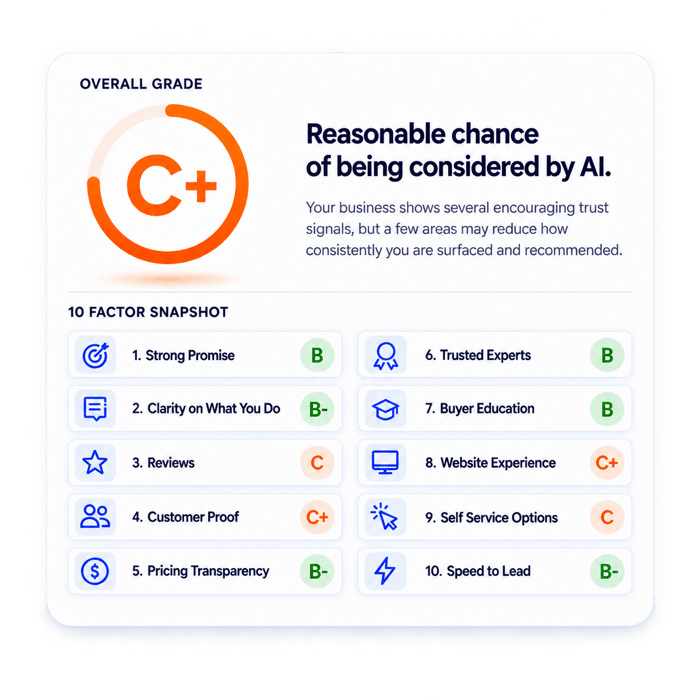
How known, trusted, and recommended is your company?
See how your business scores across the 10 factors that influence whether buyers and AI know you, trust you, and recommend you.
Run My Free Diagnostic →
About Mandy York
Coach
Mandy York is an Endless Customers Coach who has spent four years coaching IMPACT clients across video, written content, EEAT, and leadership. Before IMPACT, she led a vocational school and earned a master's degree in organizational leadership, a background that shapes how she coaches companies to build real structure around their marketing and content, not just produce more of it.