Your writer has a list of article ideas. Your videographer has a separate production calendar. Sales keeps asking for answers to questions neither list covers. Everyone is busy, but the work doesn’t consistently help the next buyer.
A shared content process gives the team one place to decide which questions matter, gather expert answers, and turn them into useful articles and videos. AI can assist with that work. Someone still needs to own the decisions, the facts, and the finished result.
Here’s a practical workflow you can use with Trello or adapt to the project tool your team already has.
Start with one buyer question and a clear owner
Choose a service or product your business wants to sell more of. Ask sales and customer service which questions make people hesitate, misunderstand the offer, or arrive unprepared.
Use The Big 5 as a starting point: cost, problems, comparisons, reviews, and best options. Keep the question in the buyer’s language. “Heat pump content” is a topic. “When is a heat pump a poor choice for an older home?” gives your expert something specific to answer.
Assign a content owner who moves the topic through the process. Identify the expert who will supply and verify the answer, the writer, the video owner where needed, and the person who approves publication. One person can hold several roles. Each responsibility still needs a name.
Use one backlog and separate production cards
Begin with a shared backlog of buyer questions. When a topic is selected, create separate article and video cards linked to the same brief. This lets the formats move at different speeds without losing their common purpose.
For the heat pump example, the brief might lead to an article explaining suitability, a demonstration with an installer, and a short clip addressing one common misconception. Each asset should do a useful job. You don’t need to turn every article into every format.
The brief should explain the buyer question, the decision the content supports, the expert, the evidence needed, the intended next step, and the conditions that would make the answer different.
Set up the workflow in Trello
In Trello, create a board for your content work. Name it clearly, choose the appropriate workspace and visibility, and give access to the people responsible for the work. Keep customer information and unfinished internal discussions in the appropriate private workspace.
Create these lists:
- Buyer questions: the shared backlog, with the source of each question.
- Selected and briefed: work the team has committed to producing.
- Expert input: interviews, demonstrations, research, and evidence gathering.
- In production: writing, filming, and editing.
- Expert review: checking facts, nuance, examples, and claims.
- Ready to publish: approved assets with the remaining publishing details.
- Published and distributed: live links, sales use, and distribution notes.
- Needs an update: published content with a known gap or outdated information.
These are recommended list names, not required Trello settings. Adapt them to the way your team works. Keep the number of stages small enough that moving a card remains useful.
Use labels such as Article and Video to distinguish formats. Assign the responsible member and a due date to each production card. Link the paired cards and their shared brief in the descriptions. Move each card to reflect its actual status.
Create a reusable card using Trello’s template-card feature. Include the brief fields below and your review checklist. This setup uses ordinary cards, descriptions, labels, and checklists; optional automation and advanced features can be added later if your plan supports them.
A content brief you can copy
- Buyer question: the exact question we are answering.
- Who needs this: the buyer’s role, situation, and decision.
- Why now: the sales conversation, search observation, or service issue that surfaced it.
- Main answer: the expert’s direct answer, including conditions and limits.
- Evidence: source links, examples, demonstrations, approved customer material, and facts to verify.
- Owner and expert: who moves the work and who confirms its accuracy.
- Formats: article, video, or both, with links to the production cards.
- Next step: the resource or action that will help this reader.
- Sales use: when a salesperson would send it and why.
- Review date or trigger: when to revisit it, or which change would make it outdated.
Gather the expert’s answer once
Bring the writer and video owner into the same planning conversation when both formats are needed. Ask the expert for the direct answer, the exceptions, the mistakes buyers make, and an example they can explain from experience.
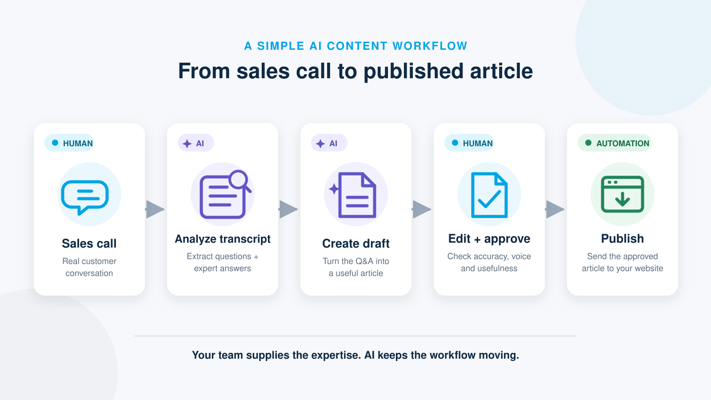
Record the conversation with the appropriate permission and create a transcript. Ask follow-up questions before drafting. If the expert says “it depends,” find out what it depends on. If they say a solution saves time, ask how that was measured and what else changed.
Capture visual opportunities while you’re talking. A comparison of two products may need a demonstration. A process explanation may need footage of the actual steps. Identifying those needs early prevents a finished script from reaching the videographer without the material required to make it useful.
Give the article and video different jobs
The article can hold the full explanation, definitions, comparison details, source links, and exceptions. The video can show the people, process, demonstration, or judgment that is easier to understand when you see it.
For the heat pump question, the article could explain the home characteristics an installer needs to evaluate. The video could show the assessment and discuss why the same equipment might suit one property and disappoint another. Both should use the same verified facts.
Write a video outline for spoken delivery. Reading the entire article into a camera often creates a slower experience than the topic needs. Let the expert explain naturally, then edit for clarity while preserving the meaning.
Use AI for a defined task
AI can help organize interview notes, identify questions the draft hasn’t answered, suggest an outline, or adapt approved material into a short script. Give it the source material and a specific job.
Using this approved interview transcript, create an article outline and a separate demonstration-video outline answering the buyer question below. Preserve qualifications and disagreements. Flag claims that need evidence. Do not invent facts, quotes, pricing, customer examples, or results. List questions we still need to ask the expert.
Use only tools and information your company has approved for that purpose. The content owner should check the output against the original material, and the expert should review the answer before publication.
A useful AI draft can save time. A confident invented detail can create extra review work and damage trust. Make verification a normal stage of production.
Add a publishing checklist
Trello lets you add a checklist to a card and reuse items from an existing checklist. Use one to make the completion criteria visible:
- The buyer’s main question has a direct answer near the beginning.
- The expert has checked the facts, examples, limits, and recommendations.
- Claims and statistics have appropriate sources and dates.
- Customer names, quotes, images, and results have the required permission.
- The title and description accurately represent what the content delivers.
- The article has useful headings and working links.
- The video has accurate captions and a useful written summary or transcript.
- The next step fits the reader’s question and readiness.
- The live page has been checked on desktop and mobile.
- Sales knows when to use the resource, and an owner will maintain it.
Clear answers, accessible text, and evidence make the content easier to evaluate. Google’s guidance on AI search features also reinforces the relevance of established SEO practices. There is no checklist that guarantees a citation or recommendation.
Plan distribution before you publish
Decide where the complete resource will live and which other pieces will point to it. A short social clip should answer a useful question on its own and make the full explanation easy to find. An email should explain why the topic matters to that audience.
For sales, write a sentence explaining when to send the resource. “Send before the estimate when a homeowner is comparing system types” is more useful than “new video is live.” IMPACT’s Assignment Selling guidance can help your team use content in an actual buying conversation.
Keep a weekly review short and specific
Review what is blocked, what needs an expert decision, what sales is hearing, and which published answers need updating. Limit how much work enters production to what your team can finish. If five cards are waiting on the same expert, adding five more topics will not solve the delay.
Measure production time and bottlenecks alongside buyer outcomes. Are salespeople using the resources? Are buyers arriving with better questions? Which pages support qualified inquiries? Avoid treating the number of articles and videos as proof of business impact.
Run the process with one topic first
Choose a question buyers keep asking. Create the brief, interview the expert, produce the formats that serve the answer, and use the finished work in a real sales conversation. Review what slowed you down and what the buyer still needed to know.
For the broader strategy behind this process, read IMPACT’s content marketing strategy guide. If your team needs help building the skills and habits to sustain the work, explore Endless Customers coaching.

/Assets/arrow-facing-left--black-01.svg)
/Assets/navigation-global--close-symbol-black-01-1.svg)
/Assets/Icon%20Library/social/facebook-logo.svg)

/Assets/Icon%20Library/social/instagram-logo.svg)
/Assets/Icon%20Library/social/youtube-logo.svg)





/Assets/navigation-global--close-symbol-black-01.svg)

/Assets/Icon%20Library/x%20corp.svg)
/Assets/base/Learning%20Center%20Resource%20Category%20Icons/Facebook_Messenger_logo_black.svg)
/Assets/Icon%20Library/whatsapp%20logo.svg)
/Assets/Icon%20Library/Email.svg)

/Assets/Icon%20Library/Arrows/Grey%20Arrow%20-%20Prev.svg)
/Assets/Icon%20Library/Arrows/Grey%20Arrow%20-%20Next.svg)




.png)