Updated October 24, 2026.
Your marketing system sends a follow-up email seconds after someone downloads a guide. That sounds efficient. Then the person books a meeting, and the system keeps sending messages asking them to book a meeting.
The software completed its instructions. The experience still failed.
Marketing automation works best when a business understands what the buyer needs, keeps reliable records, and gives someone responsibility for the complete journey. AI expands what these systems can do, which makes those foundations more valuable.
This guide explains how marketing automation evolved, what AI changes, and how to build workflows that help buyers make progress.
What is marketing automation?
Marketing automation uses software to perform recurring marketing tasks based on information, events, and defined conditions. Examples include delivering a requested resource, routing an inquiry, updating a contact record, or sending an appropriate follow-up.
A useful workflow has a trigger, eligibility criteria, actions, and a stopping point. Someone should also own it. For a basic example, a webinar registration can trigger a confirmation, a reminder, and a follow-up containing the recording. A cancellation should change what happens next.
IBM's overview describes automation across channels and its connection to CRM, segmentation, and customer journeys. The value comes from making a useful process dependable.
How marketing automation evolved
The history is a series of overlapping capabilities. There is no single launch date that explains the entire category.
Customer databases made information easier to organize
Early customer databases and CRM systems helped businesses move beyond scattered contact lists. They made it possible to record relationships and interactions in a more consistent way. That information became the basis for deciding which people should receive which communication.
Email and web activity made triggered follow-up practical
As more buying activity moved online, businesses gained opportunities to respond to actions such as a form submission or an event registration. Platforms connected email, website activity, and customer records so teams could build sequences and manage campaigns more systematically.
Connected platforms brought marketing and sales into the same process
Marketing automation expanded into nurturing, scoring, routing, and reporting. Systems could hand a contact to sales, create a task, or change a sequence as the relationship developed. This made agreement between marketing and sales more consequential: the system needed a shared definition of progress.
AI adds prediction, interpretation, and generation
AI can help identify patterns in data, classify information, summarize conversations, and draft content. Some systems can recommend actions or execute steps through connected tools. The particular capabilities depend on the product, its permissions, and the data available.
That progression creates a leadership challenge. As software performs more of the work, a business needs to be clearer about what good work looks like and when a person should intervene.
How is AI different from a traditional workflow?
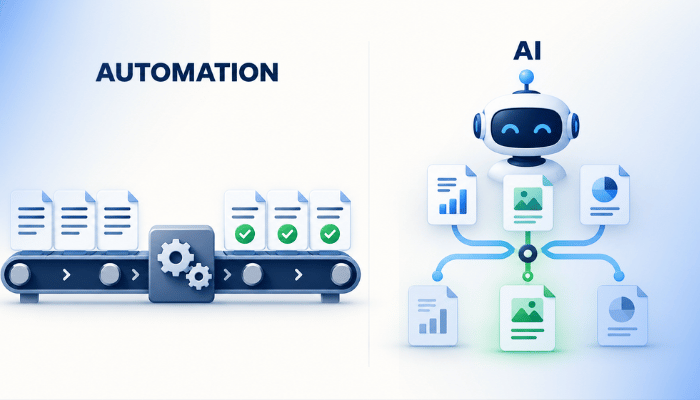
A rules-based workflow follows conditions you specify. If a contact requests a pricing guide, send the guide. If they book a meeting, stop the meeting-request sequence. The business defines the logic.
A predictive model estimates an outcome from patterns in data. It might help prioritize contacts that resemble previous successful opportunities. A generative model produces content, such as a summary or draft response. An automated workflow can use either kind of output, but the output still needs an appropriate level of review.
For example, an AI system might summarize a buyer's inquiry and propose a topic category. A rule can then route that category to a team. If the inquiry is ambiguous, a person can review it before anyone receives a misleading answer.
Use predictable rules for decisions the business can define clearly. Use AI where interpretation adds value, then test its accuracy in the situations your customers actually create.
Start with segmentation that changes the experience
Segmentation means grouping people in a way that lets you serve them more appropriately. A useful segment changes the content, timing, owner, or next step.
Start with information people have provided and facts your team has verified:
- Relationship: prospect, active opportunity, customer, or former customer.
- Need: the product, service, or problem the person has asked about.
- Fit: service area, relevant requirements, and other criteria that affect whether you can help.
- Progress: requested information, scheduled a conversation, received a proposal, or started onboarding.
- Communication preferences: what the person has agreed to receive and through which channels.
A roofing company could separate someone researching repair from someone asking for a full replacement estimate. A software business could distinguish a current customer's support request from a prospect's implementation question.
Keep the first version small. Five useful segments with reliable data are easier to manage than dozens built on guesses. Avoid inferring personal characteristics that have no legitimate role in serving the buyer.
Traditional versus predictive lead scoring
Lead scoring helps a team decide where to pay attention. It should be a decision aid with a clear purpose.
Rules-based scoring
Your team assigns values to known attributes or actions. A relevant service area might contribute to fit; a consultation request might indicate intent. The advantage is that the logic is visible and easy to discuss. The weakness is that your assumptions can be wrong.
Predictive scoring
A model looks for patterns associated with an outcome in historical data. It may find relationships that a team would miss, but its usefulness depends on the quality, volume, and relevance of that history. A business entering a new market should be cautious about treating old patterns as universal.
Keep fit and engagement distinguishable
A highly active visitor can still be a poor customer fit. A qualified buyer can also be ready to talk after very little measurable website activity. HubSpot's scoring documentation describes AI-assisted fit and engagement scores; availability and requirements depend on the account.
For either approach, define the outcome the score is meant to support. Review high-scoring contacts that did not qualify and low-scoring contacts that became customers. Give explicit inquiries a clear response path rather than making every buyer wait for a score threshold.
Four workflows worth building before adding more complexity
Deliver the answer someone requested
Send the promised resource immediately, record the request, and provide a relevant next step. If the resource answers an early research question, allow the person to continue learning at that stage.
Prepare a buyer for a scheduled conversation
Send an agenda and a small amount of content that helps the person prepare. This can include a pricing explanation, a comparison, or a video answering common concerns. Stop promotional meeting requests once the appointment is booked.
Route an inquiry to the right owner
Use verified criteria to assign responsibility. Create an exception path for missing information and a follow-up check for inquiries that have not received a response. The buyer should not have to understand your organization chart.
Move a new customer into the correct experience
When a deal becomes a customer, stop inappropriate prospect messages, introduce the next responsible person, and explain what happens next. Check that marketing and delivery agree on the handoff.
A practical workflow for a pricing-guide request
- The person requests the guide and receives it.
- The record stores the requested topic and permitted communication preferences.
- If the person also requests a consultation, the inquiry goes to a named owner.
- If they are still researching, an appropriate follow-up offers a related comparison or explanation of cost factors.
- A booking, purchase, opt-out, or change in need stops or changes the sequence.
- The owner reviews delivery problems, unanswered replies, and buyer feedback.
AI could help summarize replies or suggest the relevant approved resource. A person should review questions that require judgment about fit, commitments, or unusual circumstances.
What automation can contribute to AI visibility
Your CRM can reveal recurring questions, misunderstood services, and objections that deserve a public answer. With appropriate access and review, AI can help organize those patterns for the content team.
The public work still matters: write the answer, support it with evidence, identify the expert, and keep it accurate. Private email sequences do not become a public knowledge base simply because they are automated. Use recurring buyer questions to improve content people and search systems can access.
Measure buyer progress and business outcomes
Track whether the workflow delivers its promise, reaches the right owner, and stops at the right time. Then evaluate qualified conversations, opportunities, customer outcomes, and the time your team spends correcting problems.
Review a sample of real journeys with sales. Ask whether the communication was useful and whether the next step made sense. High email activity can coexist with a poor buying experience.
Start by auditing one workflow from the buyer's perspective. Fix its eligibility, content, ownership, and stopping rules. Once it works reliably, use the same discipline on the next one. Our guide to aligning sales and marketing can help your team agree on the process before building more automation.

/Assets/arrow-facing-left--black-01.svg)
/Assets/navigation-global--close-symbol-black-01-1.svg)
/Assets/Icon%20Library/social/facebook-logo.svg)

/Assets/Icon%20Library/social/instagram-logo.svg)
/Assets/Icon%20Library/social/youtube-logo.svg)





/Assets/navigation-global--close-symbol-black-01.svg)

/Assets/Icon%20Library/x%20corp.svg)
/Assets/base/Learning%20Center%20Resource%20Category%20Icons/Facebook_Messenger_logo_black.svg)
/Assets/Icon%20Library/whatsapp%20logo.svg)
/Assets/Icon%20Library/Email.svg)

/Assets/Icon%20Library/Arrows/Grey%20Arrow%20-%20Prev.svg)
/Assets/Icon%20Library/Arrows/Grey%20Arrow%20-%20Next.svg)



.png)